Gemini API Computer Use is GA: what changed for agent builders
Gemini API Computer Use became GA on October 30, 2026, with browser, mobile and desktop environments, safety policies and opt-in injection detection.
Key takeaways
- Gemini API Computer Use became generally available on October 30, 2026.
- Gemini 3.8 Flash is the recommended model; browser, mobile and desktop are supported.
- Your code executes each action and must ask a person on require_confirmation.
- It is billed as regular model tokens and is not on the free tier.
On this page
The Gemini API Computer Use tool is generally available as of October 30, 2026, across both the Interactions API and the GenerateContent API [1]. The tool lets a Gemini model operate a browser, a mobile device or a desktop by reading screenshots and returning UI actions that your own code executes [2]. On the paid tier it is billed as regular model tokens, and it is not available on the free tier [3].
What changed with the Computer Use GA?
The tool moved from preview to general availability, and it now works with the current Gemini model line instead of a single specialized model. The release note itself is one line: Computer Use is GA across the Interactions and GenerateContent APIs [1]. The substance is in the documentation, which describes what the tool can do today [2].
The preview started on October 7, 2025, with Gemini 2.5 Computer Use, a specialized model built on Gemini 2.5 Pro and offered in public preview through Google AI Studio and Vertex AI [4]. At that launch, Google said the model was primarily optimized for web browsers, showed promise for mobile, and was not yet optimized for desktop OS-level control.
| Preview (October 2025) | GA (October 30, 2026) | |
|---|---|---|
| Models | Gemini 2.5 Computer Use [4] | Gemini 4 Argon, Gemini 3.8 Flash, Gemini 3.5 Flash-Lite, Gemini 3 Flash Preview [2] |
| Environments | Browser first, mobile promising, desktop not yet optimized [4] | browser, mobile and desktop [2] |
| Status | Public preview | Generally available [1] |
| Safety controls | Per-step confirmation for some actions [4] | Seven policy categories, configurable, plus opt-in prompt injection detection [2] |
The documentation names Gemini 3.8 Flash (gemini-3.8-flash) as "the recommended model for computer use" [2]. It also says Gemini 4 and Gemini 3.x models add multi-environment support, an intent field on each action, configurable safety policies and prompt injection detection.
The GA lands at the end of a busy month for the Gemini API. Gemini 4 Argon became generally available on October 13, 2026, and a Gemini API CLI for coding agents, scripts and CI pipelines entered beta on October 27, 2026 [1].
How does the Computer Use agent loop work?
Computer Use runs as a loop in which the model proposes one or more UI actions and your client carries them out. The model never touches the machine itself. It works like function calling: the model returns actions such as clicks, scrolls and keystrokes, and your code executes them, for example with Playwright [2].
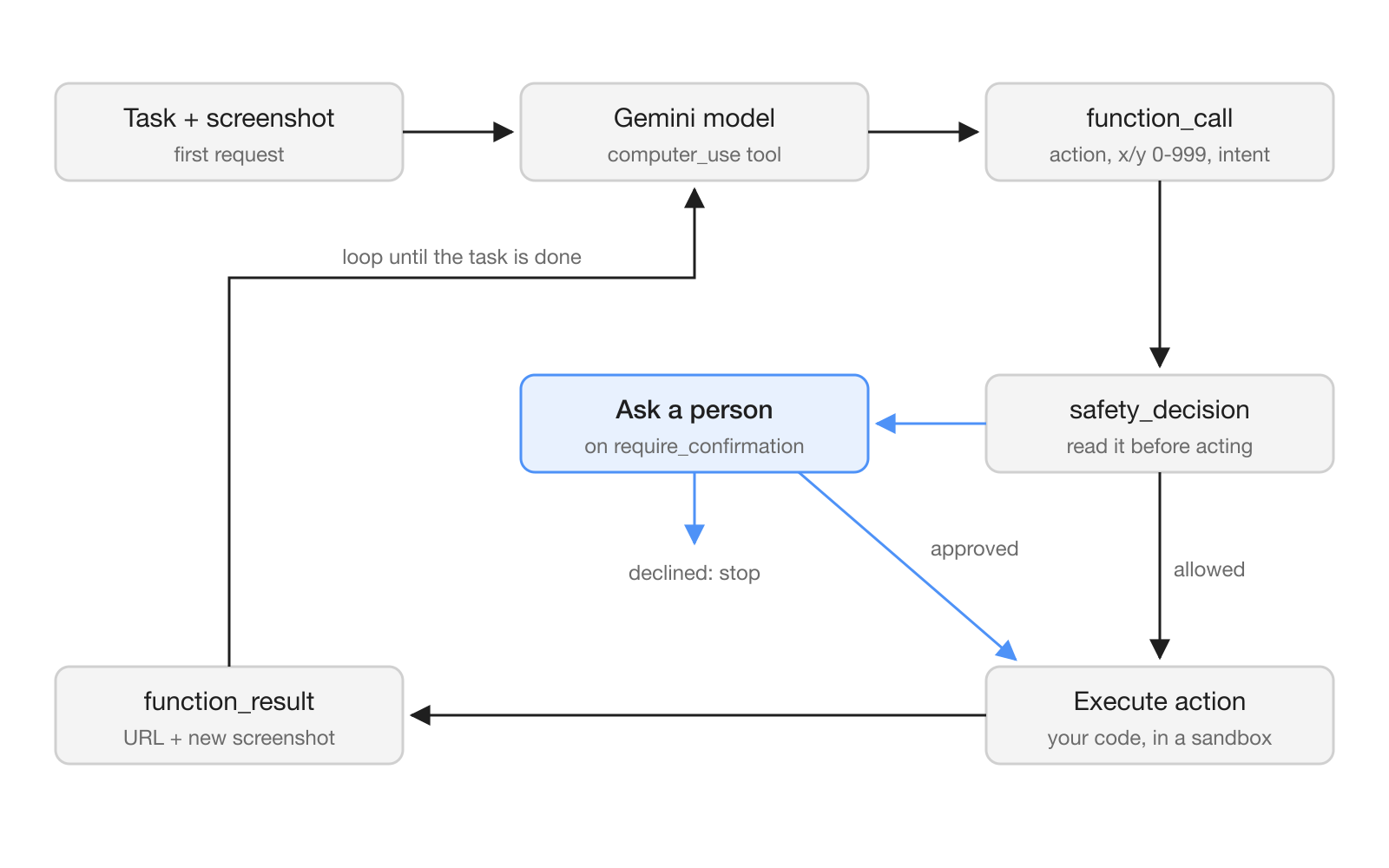
The documented loop has five steps [2]:
- Send the prompt, the tool configuration and a screenshot.
- Receive
function_callsteps, each with anintent, and possibly asafety_decision. - Execute the allowed actions, and stop or handle the blocked ones.
- Capture a new screenshot and return it in one
function_resultper call. - Repeat until the task is done.
Coordinates use a normalized grid. The action arguments list x and y as integers from 0 to 999, and the sample code scales them to the real viewport before clicking [2]. If your agent clicks in the wrong place, check this conversion first.
The browser environment has the widest action set, 20 predefined actions including click, double_click, drag_and_drop, type, hotkey, scroll, navigate, go_back and take_screenshot [2]. The mobile environment adds open_app, list_apps and long press, and the desktop environment mirrors the browser set with OS-level cursor commands and no navigation actions.
How do you call Computer Use from Python?
You add a tool of type computer_use to an Interactions API request and pick an environment. The Python SDK needs google-genai 2.7.0 or higher, and later turns continue the run with previous_interaction_id [2]. This first request follows the documentation's example:
from google import genai

client = genai.Client()

interaction = client.interactions.create(
    model="gemini-3.8-flash",
    input="Find a flight from SF to Hawaii on Jun 30th, coming back on Jul 6th",
    tools=[
        {
            "type": "computer_use",
            "environment": "browser",
            "enable_prompt_injection_detection": True,
        }
    ],
)
After you execute an action, you send back a function_result with the action name, its call_id, and a result list that holds a text item and an image item. In the documented sample, the text item is JSON with the current page URL merged with the action's own result, and the image item is the new PNG screenshot, base64-encoded [2].
Three tool options shape what the agent can do [2]:
| Option | What it does |
|---|---|
environment | browser, mobile or desktop |
excluded_predefined_functions | Removes predefined actions, for example ["click"] |
disabled_safety_policies | Relaxes named safety policies, for example ["data_modification"] |
enable_prompt_injection_detection | Opt-in, defaults to false, needs Gemini 3.5 Flash-Lite or later |
You can also register your own functions next to the tool. The documentation's example adds a yield_to_user function that hands control back to a person when an action is unsafe or ambiguous, such as when a second-factor code is needed [2].
What safety controls does the Computer Use tool have?
Each function call can carry a safety_decision, and your client must honor it. When the decision is require_confirmation, you ask the user; if they approve, you send safety_acknowledgement in the function result, and if they decline, you stop [2].
The built-in policies cover seven categories: FINANCIAL_TRANSACTIONS, SENSITIVE_DATA_MODIFICATION, COMMUNICATION_TOOL, ACCOUNT_CREATION, DATA_MODIFICATION, USER_CONSENT_MANAGEMENT and LEGAL_TERMS_AND_AGREEMENTS [2]. You can disable specific ones, but the documentation says the model may still return require_confirmation, so your application has to handle it either way.
Prompt injection detection is the new defense against hidden instructions in a page. When it is on, the model blocks execution if it finds adversarial instructions in screenshots. It is off by default and needs Gemini 3.5 Flash-Lite or later [2].
What does Computer Use cost?
Computer Use has no separate fee. On the paid tier it is charged as regular tokens at the model's price, and it is not available on the free tier [3]. For the recommended Gemini 3.8 Flash, the paid Standard price is $0.75 per 1M input tokens and $3.75 per 1M output tokens, including thinking tokens, through December 31, 2026. From January 1, 2027, the listed prices are $1.50 and $7.50 [3].
Every turn of the loop sends a new screenshot back to the model [2], so the cost of a task grows with the number of steps it takes. Budget for steps, not only for the length of the prompt, and plan for the price change on January 1, 2027.
What does this mean for teams running AI agents?
GA means a team can now put a browser or desktop agent into a production workflow on a supported API, but the human checkpoints are the team's job. The model asks for confirmation; your application decides who sees that request and how fast they answer. In a shared workspace, route the require_confirmation prompts and yield_to_user handoffs to the person who owns the task, not to whoever started the agent.
The documentation's best practices read like an operations checklist: keep a human in the loop for approvals, run the agent in a sandboxed environment, use allowlists or blocklists, log in detail, and start every run from a consistent state [2]. Start with a narrow task on a site you control before giving the agent anything that spends money or sends messages.
What are the limits and open questions?
Google's documentation says plainly that "Computer Use may contain errors and security vulnerabilities," and recommends close supervision for important tasks [2]. It advises against using the tool for critical decisions, sensitive data, or actions where errors cannot be undone.
Some details are still missing. The Computer Use page does not list rate limits, quotas or a per-environment accuracy figure [2]. Prompt injection detection is opt-in, so an agent that browses untrusted pages without it relies only on the safety policies and on your own guardrails. The examples focus on the Interactions API, so if you build on GenerateContent, check the request shape against the API reference before you migrate.
Frequently asked questions
Is Gemini Computer Use generally available?
Yes. Google's Gemini API release notes list Computer Use as generally available on October 30, 2026, across the Interactions API and the GenerateContent API.
Which Gemini models support Computer Use?
The documentation lists Gemini 4 Argon, Gemini 3.8 Flash, Gemini 3.5 Flash-Lite and Gemini 3 Flash Preview, and names Gemini 3.8 Flash as the recommended model for computer use.
Does Gemini Computer Use run actions on its own?
No. The model reads screenshots and returns UI actions such as clicks and keystrokes, and your client code executes them, for example with Playwright, then sends back a new screenshot.
How much does Gemini Computer Use cost?
There is no separate fee. On the paid tier it is charged as regular tokens at the chosen model's price, and the tool is not available on the free tier.
Does Gemini Computer Use protect against prompt injection?
It offers opt-in prompt injection detection that blocks execution when hidden adversarial instructions appear in screenshots. It is off by default and needs Gemini 3.5 Flash-Lite or later.