What are Mistral Managed Agents, and how does the Agents SDK work?
Mistral Managed Agents, in public preview since November 5, 2026, run Python agents built with the Agents SDK locally, on your workers or on Mistral.
Key takeaways
- Mistral released Managed Agents and the Agents SDK in public preview on November 5, 2026.
- One Python agent runs in your process, with agents serve on your worker, or with agents deploy on Mistral.
- Tool calls run without approval by default; a PermissionPolicy can allow, ask or deny per tool.
- Deployed sessions live on Mistral, resume after a crash and end after 24 hours by default.
On this page
Mistral Managed Agents is a runtime in Mistral Studio, released in public preview on November 5, 2026. It runs agents you write in Python with the new Agents SDK (mistralai-agents). You define an agent once, then run the same code in your own process, on your own workers with agents serve, or on Mistral's infrastructure with agents deploy. Deployed agents keep running in the background, resume after a crash and can wait for a human approval [2].
What did Mistral release on November 5?
Mistral released Managed Agents and the Agents SDK as part of a larger Studio update, together with workflows, apps, evaluations and tracing [2]. The announcement says developers can give managed agents skills that capture a team's procedures, sandboxes to run code, subagents for parts of a task, and hooks for custom logic at key points in a run. In its words, "Studio manages the runtime behind all that work" [1].
The release notes list a dozen related items under the same date. Most are public previews:
| Item | Status on November 5, 2026 |
|---|---|
| Managed Agents and the Agents SDK | Public preview |
| Workflow builder (describe an automation in natural language) | Public preview |
| HTTP API connectors (call a web API without an MCP server) | Private preview |
Mistral Apps CLI (mistral apps) | Public preview |
Offline evaluations with mistralai-evaluations | Public preview |
| Managed datasets, including datasets built from production traces | Public preview |
| Managed search index (hosted vector index) | Public preview |
| Tracing for managed agents | Public preview |
| Webhooks and triggers | Public preview |
| Online evaluations on live traffic | Public preview |
| Studio apps in Vibe Code Web | GA |
All of these entries are marked Mistral-hosted [2]. The same announcement also introduced Mistral Large 4, and it says agents, workflows and apps can be deployed in the cloud, in your own VPC or on-premises [1]. The release notes do not give a date for the self-managed options.
Mistral warns that during the preview the API, behavior and limits can change in ways that need code changes [3].
How does the Agents SDK work?
An agent in the SDK is a Python object that names a model, instructions, tools, connectors, skills, an environment, and which tool calls need approval [3]. The documentation splits a running agent into four parts:
- Model: decides whether to answer or to call a tool.
- Harness: runs the loop of model calls and tool calls and records each step.
- Session: the record of messages, tool calls and results, grouped into turns.
- Environment: a sandbox where the agent can run shell commands and edit files. An agent has no environment by default.
That split is what makes the three run modes possible. The harness and your tools can run in your program, on your own worker, or on Mistral's machines, and the agent definition stays the same [3].
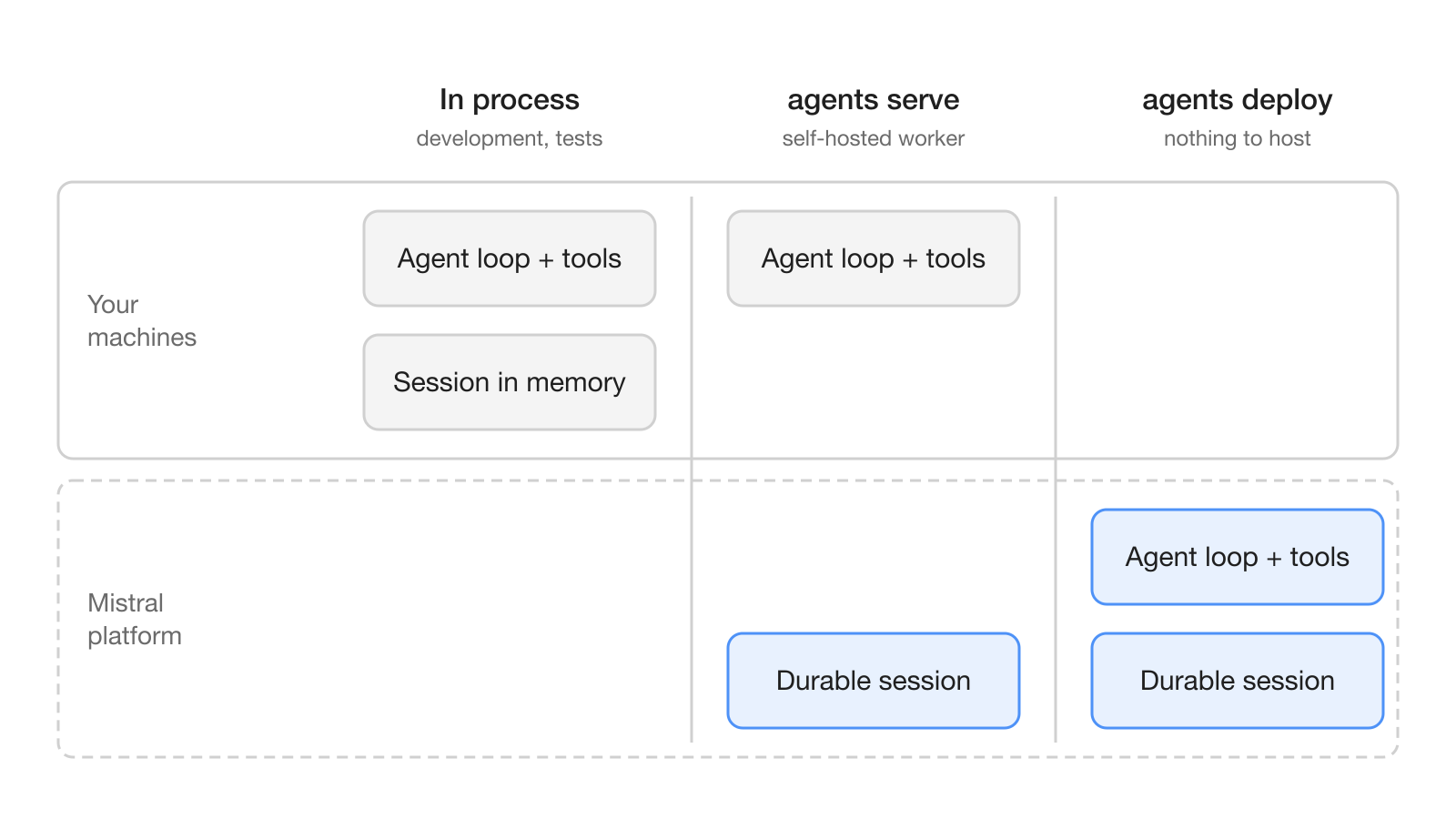
The run modes page spells out who operates what [4]:
| In process | Self-hosted (agents serve) | Mistral-managed (agents deploy) | |
|---|---|---|---|
| Your tools run in | your process | your agents serve worker | Mistral's infrastructure |
| Session is kept | in memory, or on disk with the experimental journal | stored by Mistral | stored by Mistral |
| Tracing in Studio | off | on by default, with prompt and completion content | on by default, with prompt and completion content |
| Best for | development, tests, scripts | production on infrastructure you control | production with nothing to host |
In both deployed modes, sessions are durable. A turn normally resumes from its last finished model or tool call when a worker comes back, and your app can exit and fetch the result later [3]. By default a session ends after 24 hours, or after 4 hours idle, and both limits can be raised [3].
How do approvals and subagents work?
Approvals are off by default. The permission_mode of an agent defaults to "auto", which means a tool call runs unless a permission policy says otherwise [5]. To get a human in the loop you either set permission_mode="ask", which asks before every tool call, or attach a PermissionPolicy that allows, asks or denies per tool:
rules = agents.PermissionPolicy(
    default="deny",
    rules=[
        agents.PermissionRule(tools=["client.get_alert"], decision="allow"),
        agents.PermissionRule(tools=["client.open_case"], decision="ask"),
    ],
)
The first matching rule wins, unmatched calls get the policy's default, and rules match the tool ID rather than the name the model sees [5]. Your code can answer approvals through an on_approval function that returns AllowApproval(), DenyApproval() or KeepCallbackOpen(), the last one handing the decision to a person. A person can answer later with turn.answer(...) from any process that can open the session.
An approval waits one hour. If nobody answers, the call does not run, the model is told that no one approved it, and the turn continues [5]. Write your instructions so the agent handles a missing approval sensibly instead of retrying.
Subagents replace the handoffs of the older Agents API [9]. Each subagent is a session of its own with a required name, description and instructions; the parent's model picks one by reading its name and description, and the subagent reports back instead of taking over the conversation [6]. The limits are tight by design:
- At most 10 subagent turns run at once across the whole tree, adjustable with
subagent_policy. - The tree is two levels deep.
- Subagents share the root's sandbox, and cancelling the root session ends every subagent.
- A deployed agent with subagents must use
MistralSandboxorNoSandbox, or it stops at startup.
What does this mean for teams running AI agents?
For teams, the main change is that a Mistral agent can now run for hours on its own, pause for a person, and pick up where it left off without anyone hosting a database [3]. Mistral's own example is an incident-investigation agent that follows the team's runbook, asks for approval before sensitive actions and posts its findings in Slack [1].
Three decisions come before the first deployment:
- Where tools run. If a tool touches internal systems,
agents servekeeps the tool code on your machines, but sessions are still stored by Mistral and model calls are served by Mistral [4]. - What goes into traces. Deployed modes send traces with prompt and completion content to Studio by default [4]. The release notes add that spans are redacted on the worker before they leave [2]; check what your data policy allows.
- Who approves what. Because the default is
"auto", write aPermissionPolicywithdefault="deny"before an agent gets write access [5]. In a workspace where people and agents share channels, such as Hardi, that policy decides which agent actions reach a person before they run.
How do you build and deploy a first agent?
You start with uv and Python 3.12, 3.13 or 3.14; the free-threaded 3.14t build is not supported [7]. agents init scaffolds a project, or you add the pinned package to an existing one:
uvx --python 3.12 --from mistralai-agents agents init hello-agent
cd hello-agent
uv add "mistralai-agents==1.1.0"
A tool is an async function with the @agents.tool decorator, and the agent names the model and its tools [7]:
import asyncio
from mistralai import agents

@agents.tool
async def get_weather(city: str) -> dict[str, str]:
    """Weather for a city."""
    return {"weather": f"sunny in {city}"}

agent = agents.Agent(
    model="mistral-large-4",
    name="hello-agent",
    instructions="You are a friendly agent. Tell us the weather in a city.",
    tools=[get_weather],
)

async def main() -> None:
    result = await agent.run("What's the weather in Paris?")
    print(result.text)

if __name__ == "__main__":
    asyncio.run(main())
Run it locally with uv run --env-file .env agents chat. Projects made with agents init already include the sandbox extras; otherwise add the extra your sandbox needs, such as mistralai-agents[koyeb] for the Mistral sandbox. Creating a Mistral sandbox needs the cloud_user workspace role [7].
Deployment builds from git, not from your working copy. You need a GitHub repository connected through the GitHub connector in Studio and a key whose user has a role with Workflows access; agents deploy refuses unpushed commits and branches with no upstream [8]:
git push -u origin HEAD
uv run --env-file .env agents deploy
uv run --env-file .env agents logs hello-agent --follow
Agent names are unique per workspace, so redeploying the same name replaces the agent. Your app then calls the deployed agent with agents.Agent.load_from(agent_name="hello-agent"), and the turn runs on Mistral rather than in your app [8].
If you already use the Agents API, the migration guide says the SDK "replaces the Agents and Conversations API." It maps the old calls to the SDK: conversations.start becomes agent.run, append becomes start_session plus session.run, JSON schema response_format becomes output_type, and versions become deployed commits [9].
What are the limits and open questions?
The biggest limit is the preview status itself: the API, behavior and limits may change in ways that need code changes [3]. Durability also has an edge. Work that was running when a worker stopped has an unknown outcome, so tools with side effects must be idempotent and hooks can run again [4].
Several things are not stated in the pages cited here. The announcement and documentation do not publish prices for managed agents, and the migration guide gives no retirement date for the Agents and Conversations API [9]. The release notes give no date for running Studio in your own VPC or on-premises. Until those are published, treat Managed Agents as a preview to build against, not a dependency to bet a production deadline on.
Frequently asked questions
What is the difference between agents serve and agents deploy?
With agents serve you run a worker on your own machines and your tool code runs there, while Mistral stores the sessions and serves model calls. With agents deploy, Mistral builds your project from git and runs the worker and the tools on its infrastructure.
Do Mistral managed agents ask before calling a tool?
Not by default. An agent's permission_mode defaults to auto, so tool calls run unless a PermissionPolicy says otherwise; you can set permission_mode to ask, or write a policy that allows, asks or denies per tool.
What happens if nobody answers an approval request?
An approval waits one hour. If nobody answers, the tool call does not run, the model is told that no one approved it, and the turn continues.
Does the Agents SDK replace Mistral's Agents API?
Mistral's migration guide says the SDK replaces the Agents and Conversations API and maps the old calls to the new ones, for example handoffs to subagents. The guide gives no retirement date for the old API.
How much do Mistral managed agents cost?
The announcement and documentation for the November 5, 2026 release do not publish a price for managed agents. The feature is in public preview, and Mistral says its API, behavior and limits may change.