How do Claude's interactive connectors run full apps with MCP Apps?
Claude's interactive connectors now open full apps in a side panel and let Claude edit them, built on MCP Apps with app tools and embedded sites.
Key takeaways
- Since November 10, 2026, Claude's interactive connectors can open a partner's full app beside the chat or full screen.
- Through app tools, Claude edits what the open app shows, after an approval prompt.
- It runs on MCP Apps, an open MCP extension that renders server HTML in a sandboxed iframe.
- Developer support is in public preview; app tools reach a limited set of organizations.
On this page
- What changed in Claude's interactive connectors on November 10?
- How do MCP Apps work?
- What can an MCP App now do inside Claude?
- App tools: Claude acts on what is on screen
- Side panel and full screen
- Embedded sites
- What does this mean for teams running AI agents?
- How do you build an MCP App for Claude?
- What are the limits and open questions?
Interactive connectors in Claude now open a partner's full app beside the conversation or in full screen, and Claude can make changes inside the app while you watch. Anthropic announced the change on November 10, 2026. It is built on MCP Apps, the open extension to the Model Context Protocol, and developer support for the new capabilities is in public preview [1].
What changed in Claude's interactive connectors on November 10?
Interactive connectors moved from small live views to full apps. Before, Claude showed "a small live view of tools"; now, where a connector supports it, you can open the tool next to your conversation or expand it to full screen, and Claude can change the page, row or file you have open [1]. Changes appear in the tool as Claude makes them.
The launch group in the connector directory is Asana, Canva, Carta, Dropbox, monday.com, Smartsheet, Vercel and Webflow. Anthropic also describes examples from Adobe, Atlassian, Box, HubSpot and Notion, and says Figma, Harvey and Shopify are building integrations [1]. The same day, Anthropic shipped Claude Sheets, Claude Whiteboards and Claude Data, and said the Claude Marketplace lists more than 9,000 connectors and plugins [2].
| Capability | What it adds |
|---|---|
| Side panel and full screen | The app leaves the conversation and stays open next to it |
| App tools | Claude changes what the open app shows |
| Embedded websites | Your product's own site loads inside the app |
| Entry points | People open the app without asking Claude, and pin it |
The table follows Claude's developer docs [4]. The rollout covers the web and the Claude desktop app on all plans, as part of the new Claude experience that combines chat and Cowork [1]. The side panel, full-site views and pinning are not on Claude Mobile yet, and pins are saved per browser [9].
How do MCP Apps work?
An MCP App is a tool plus a UI resource. The tool's description carries a _meta.ui.resourceUri field that points to a ui:// resource, the host fetches that resource's HTML from the MCP server, and renders it in a sandboxed iframe inside the conversation [3]. The app and the host then talk over postMessage using a JSON-RPC dialect of MCP: some methods are shared with core MCP, such as tools/call, and most new ones carry a ui/ prefix.
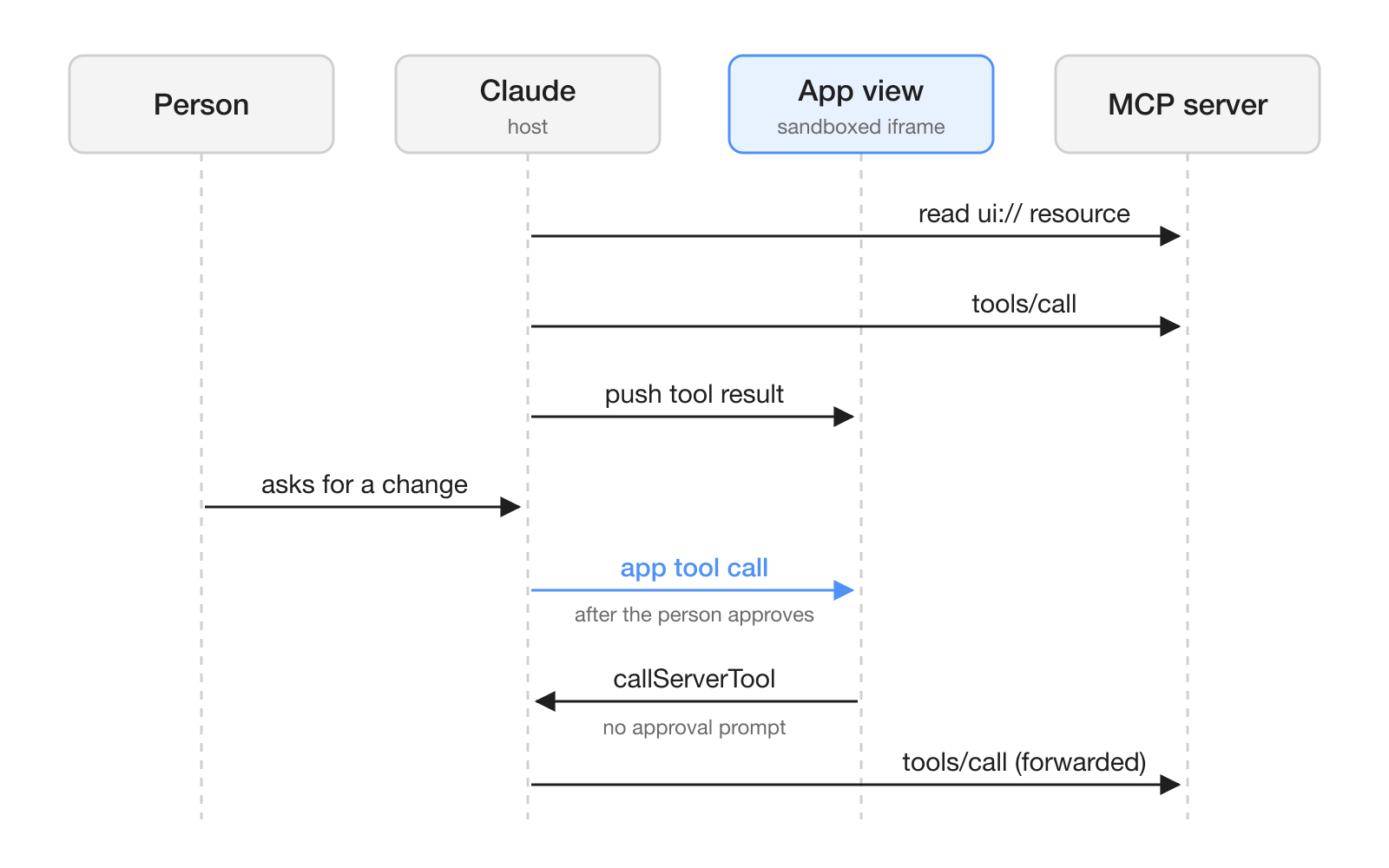
The sandbox is the security boundary. The app cannot reach the parent page's DOM, cookies or local storage, and the host decides which capabilities the app gets, for example which tools it may call [3]. A resource can ask for more through _meta.ui.csp (which external origins it may load) and _meta.ui.permissions (such as camera or microphone).
MCP Apps is not a Claude-only format. The MCP documentation lists Claude, Claude Desktop, VS Code GitHub Copilot, Microsoft 365 Copilot, Goose, Postman, MCPJam and Archestra.AI as supporting hosts [3], and Anthropic's announcement says an MCP App you build "isn't limited to Claude" [1]. Claude's docs add a migration reference for apps built on the OpenAI Apps SDK [4].
What can an MCP App now do inside Claude?
Claude's developer docs list six capabilities: side panel and full screen, entry points (open the app from the Artifacts page and pin it), app tools, messages from the app to Claude, embedded websites, and file downloads [4]. Three of them change how people and Claude share work, so they are worth a closer look.
App tools: Claude acts on what is on screen
An app tool is a tool that the view itself registers, so Claude can change what that open view shows. In the docs' shopping list example, a user asks Claude to add milk, and milk appears in the list on screen [6]. Before the tool runs, Claude asks the user to approve it, and the prompt names the connector and the tool's title; a saved Always allow choice skips later prompts.
Two details matter for builders. When the view calls a tool on its own server with app.callServerTool, the user sees no prompt, and changing a tool's name, title, description or input schema can make Claude ask for approval again [6]. App tools are available to a limited set of organizations so far, and the rest of the view keeps working where they are not.
Side panel and full screen
A view can live inline, in a side panel next to the conversation, or in full screen; Claude reports fullscreen as the display mode for both of the larger areas [7]. An app declares what it supports with availableDisplayModes, and it can ask to move with requestDisplayMode, which Claude grants only after a recent click or key press in the view. The docs suggest designing for a panel that opens at about half the chat area and narrows to about 320 pixels. The side panel, like app tools, is limited to a set of organizations for now.
Embedded sites
An MCP App can load your own website, such as your product's editor, in an iframe inside its view. You declare each origin in _meta.ui.csp.frameDomains, and Claude has to allow it: a Verified directory listing must allow the origin, a Community listing is blocked, and a custom connector loads it only after the user allows it, in a limited set of organizations [8]. Your site also has to permit framing with a frame-ancestors header that names https://claude.ai and your connector's sandbox host.
What does this mean for teams running AI agents?
For teams, the change puts the person and Claude on the same screen of the same tool. Instead of Claude describing an edit in chat and someone copying it over, Claude edits the open Confluence page or prioritizes tasks in a HubSpot pipeline and the person reviews it in place, with each action approved the way connector actions already are [1].
Admins keep the controls they had. If an organization already allows all of a connector's tools, the new features appear automatically as they roll out, and admins can restrict a connector's tools as before [1]. Team and Enterprise owners can also switch off only the tool calls that render interactive views in Organization settings, while the connector's text tools keep working [9]. Claude works within each user's existing permissions in the connected tool [2].
Review the Auto permission setting before a rollout. In Auto, Claude can use a tool or display an app without asking [6][4], which suits a sandbox but may not suit a shared CRM. In a workspace such as Hardi AI, where people and agents already work in shared channels, the same rule applies: decide which tools an agent may change without a person approving each call.
How do you build an MCP App for Claude?
You add a UI resource to an MCP server you already have. The official quickstart installs @modelcontextprotocol/ext-apps (verified with version 1.7.5), registers the tool with registerAppTool and a _meta.ui.resourceUri, and serves the HTML with registerAppResource under the MIME type text/html;profile=mcp-app [5].
- Install the SDK:
npm install @modelcontextprotocol/ext-apps@^1[5]. - Return both a
contenttext block andstructuredContentfrom the tool; the view draws fromstructuredContent, and text-only hosts read the text. - Set
ui.domainon the resource. For Claude it is the first 32 hex characters of the SHA-256 of your server URL followed by.claudemcpcontent.com[4]. - Host the server remotely. App tools, entry points and embedded websites need a remote server, and Claude Code calls the tool as text without rendering the UI [4][5].
- Test as a custom connector in a conversation with the unified Claude experience, with the permission setting on Manual so you see each approval [6].
To give Claude an action inside the view, register an app tool before app.connect(). This is the docs' shopping list sample, which needs @modelcontextprotocol/ext-apps 1.7.0 or later and a Standard Schema library such as zod 4.2 or later [6]:
import { App } from "@modelcontextprotocol/ext-apps";
import { z } from "zod";

const app = new App({ name: "Shopping list", version: "1.0.0" });

app.registerTool(
  "add_item",
  {
    title: "Add item",
    description: "Add an item to the shopping list that is open in this view.",
    inputSchema: z.object({ name: z.string().describe("The item to add") })
  },
  async ({ name }) => {
    const item = document.createElement("li");
    item.textContent = name;
    document.querySelector("#items")?.append(item);
    return { content: [{ type: "text", text: "Added " + name + "." }] };
  }
);

await app.connect();
The docs set hard limits on app tools. Claude receives only the first line of each description, up to 200 characters, when it lists a view's tools [6].
| Limit | Value |
|---|---|
| Tools in one view | 64 |
| All tool definitions in a view | 1 MiB as JSON |
| Tool name | Up to 128 characters, unique in the view |
| Time to respond | 45 seconds, not counting approval |
| Result text Claude reads | 100,000 characters |
What are the limits and open questions?
The biggest limit is reach. App tools, the side panel and embedded sites for custom connectors are each available to a limited set of organizations and not in every conversation, so you cannot tell from your own test what other organizations see [6][8]. Build every app so it still works inline without them.
Some behavior is Claude-specific. The preferredDisplayMode field that opens a view in the side panel without a click is not part of the MCP Apps specification or the SDK's types, and the docs say where you declare it can change [7]. For directory connectors, entry points and embedded websites work only under a Verified listing [4].
Finally, purchases through a connector's in-chat views are not supported [9], and the announcement publishes no general availability date for the developer preview [1].
Frequently asked questions
What are interactive connectors in Claude?
They are connectors whose MCP server ships its own interface, which Claude renders inside the conversation. Since November 10, 2026, supported connectors can open in a side panel or full screen, and Claude can make changes in the open tool.
Which apps support the new interactive connectors?
Anthropic named Asana, Canva, Carta, Dropbox, monday.com, Smartsheet, Vercel and Webflow as the launch group in the directory, with examples from Adobe, Atlassian, Box, HubSpot and Notion. Figma, Harvey and Shopify are building integrations.
Does Claude need approval before it changes something in an MCP App?
Yes, by default. Claude asks the user to approve an app tool before it runs, naming the connector and the tool's title, unless a saved Always allow choice or the conversation's Auto permission setting already covers the call.
Do MCP Apps work outside Claude?
Yes. MCP Apps is an open extension to the Model Context Protocol, and the MCP documentation lists hosts such as VS Code GitHub Copilot, Microsoft 365 Copilot, Goose and Postman. Some Claude features, such as preferredDisplayMode, are Claude-specific.
Can admins turn off interactive connectors without removing the connector?
Yes. Team and Enterprise owners can disable the tool calls that render interactive views in Organization settings, and the connector's text-based tools keep working.
Sources
- Your apps can now open in Claude, and Claude can work in them
- More ways to work with Claude: Sheets, Whiteboards, and Interactive Connectors
- MCP Apps
- Get started with MCP Apps
- Add an interactive UI to your MCP server
- Let Claude call tools in your MCP App
- Show your MCP App in the side panel or full screen
- Embed a website in an MCP App
- Use interactive connectors in Claude