How do Copilot Studio agent accounts and shared memory work?
Copilot Studio agent accounts, in Frontier preview, give an agent its own Entra ID and mailbox plus one memory shared by the whole team.
Key takeaways
- Copilot Studio agent accounts give an agent its own Entra ID, mailbox and Teams presence.
- The agent keeps one shared memory with no privacy boundary between users.
- Users cannot opt out; admins can only disable it by turning off agent accounts.
- Triggers start the agent from an email, a schedule or a SharePoint event.
On this page
Microsoft Copilot Studio agent accounts give an agent its own Microsoft Entra ID, mailbox and presence in Teams and the directory. Microsoft announced them on October 15, 2026, together with business process memory, and both are rolling out as previews through the Frontier program [1][2]. Such an agent keeps one memory for everyone it works with and can start work from triggers.
What did Microsoft announce for Copilot Studio?
Microsoft announced three connected features for agents that handle shared business processes: agent accounts, business process memory and triggers in the GitHub Copilot harness [1]. The post, by Jason Moore, Vice President of Product for Copilot Studio, describes "managed agents that belong to the organization, persist beyond any one individual's role or tenure" [1].
The difference from a personal assistant is ownership. An agent with an account works with its own approved credentials and scoped permissions instead of a user's or maker's credentials. Its actions are attributed to the agent itself. People can reach it in Teams and Outlook and @mention it in Word, Excel and PowerPoint comments [1].
| Feature | Status as of October 17, 2026 | What it does |
|---|---|---|
| Agent accounts | Frontier preview | Own Entra ID, mailbox, Teams and directory presence |
| Business process memory | Frontier preview | One memory shared by everyone who works with the agent |
| Triggers | Preview (prerelease docs) | An event or a schedule starts the agent without a prompt |
| Agent refinements | Planned "over the coming months" | Activity turns into recommendations for makers |
| Browser-enabled cloud computer | Upcoming, no date | A cloud computer the agent can use |
Sources for the table: the announcement [1], the agent account documentation [2] and the triggers documentation [5].
How does an agent account work?
An agent account is a real Microsoft 365 identity for the agent. Once published, the agent has its own mailbox. It can send and receive email, be added to distribution lists and be found and @mentioned in Teams like a colleague. Admins can govern and audit it like any other identity [2]. Microsoft Agent 365 provisions and governs the accounts. Copilot Studio also creates a Microsoft Entra Agent ID for each agent with an account, which admins manage separately [2].
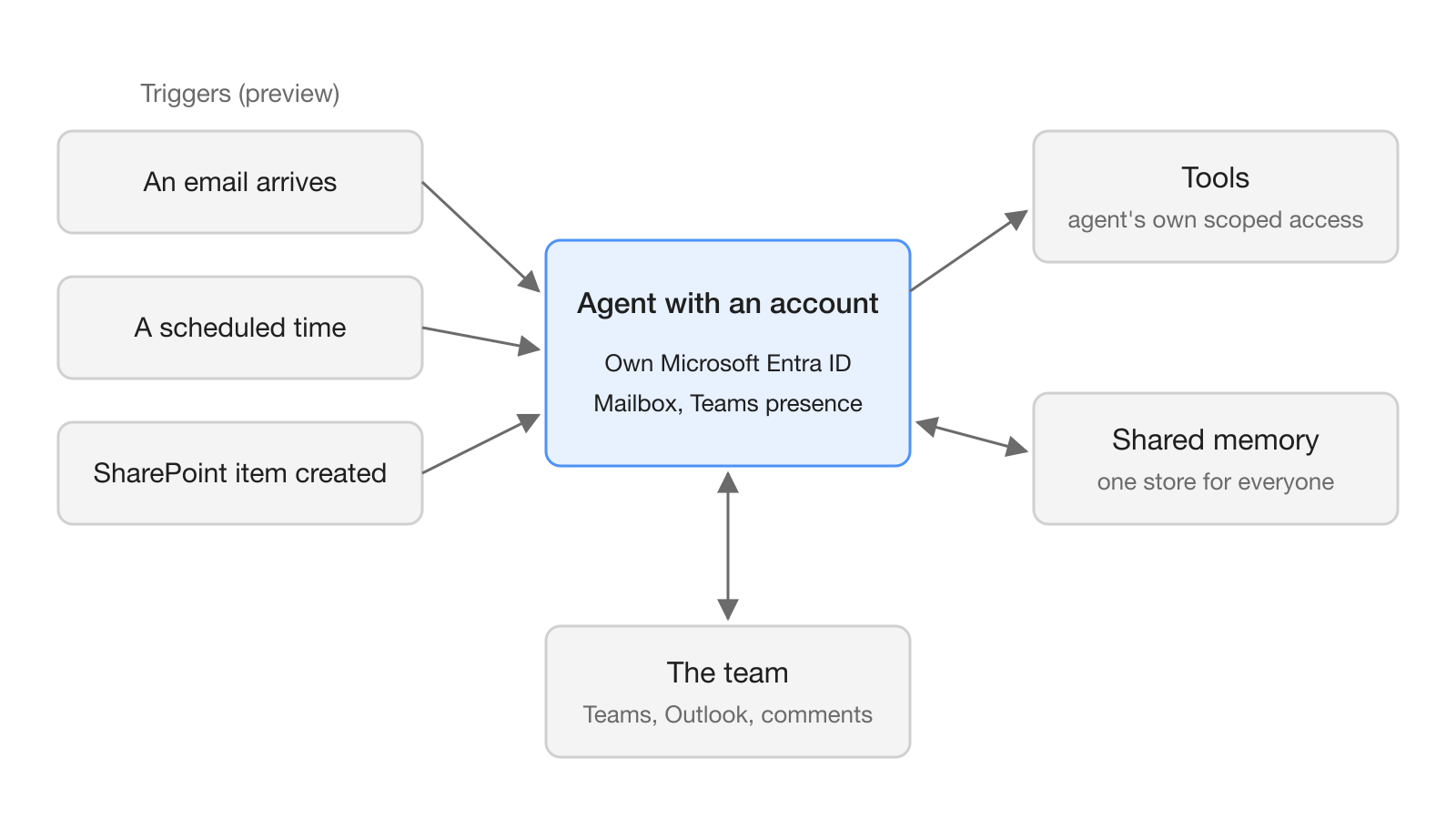
The account is an identity, not a blanket permission. The documentation says the account "does not automatically grant every tool permission". For tools that support it, the default authentication mode becomes the agent account, and tools set up for end-user authentication use the agent's identity and consent [2]. Makers still decide which identity each tool uses and grant only the access the job needs.
Triggers make the agent proactive. Microsoft's post says "an external signal (like an email) or a set cadence will trigger an agent's cycle, no additional prompt required" [1]. The trigger documentation gives examples such as a new SharePoint item, an incoming email or a scheduled time. The trigger passes event details to the agent, and the agent's instructions and tools decide what happens next [5].
How does shared memory differ from personal memory?
An agent with an account keeps a single shared memory for everyone it works with, even in one-to-one chats. Agents without an account use personal memory instead [3]. The two models behave in opposite ways on privacy.
| Personal memory (preview) | Shared memory (agent accounts) | |
|---|---|---|
| Scope | One store per user | One store for everyone who works with the agent |
| Who sees it | Only that user; the maker cannot | Anyone who works with the agent |
| Who can delete | Each user, for their own memories | Everyone who interacts with the agent |
| Automatic deletion | After 28 days without that user interacting | After 28 days with no one interacting |
| Chat types | Disabled in group chats and Teams channels | Used even in one-to-one chats |
| Turning it off | Maker toggle per agent; stored memories are kept | Only by turning off agent accounts |
The personal column comes from the Memory documentation [4], the shared column from the agent accounts FAQ [3].
The FAQ is direct about the risk. Shared memory "has no privacy boundary between users". A summary of a file or chat can appear in a response to someone who cannot open the original. End users cannot opt out in this preview [3]. The agent's People card warns that shared files or chats "can be summarized and included in the agent's responses to any user" [3].
Microsoft lists what shared memory excludes. The list covers ID and card numbers, passwords and tokens, health information, performance judgments and protected characteristics. It also excludes anything someone asks the agent not to remember and conclusions the agent inferred [3].
What do you need to try agent accounts?
You need a Frontier tenant, an early release environment, admin setup and two kinds of licenses [2]. The prerequisites are:
- The environment's Release cycle in the Power Platform admin center is Early.
- The tenant is enrolled in the Microsoft Frontier Program with the Microsoft Agent 365 Terms of Service accepted.
- The maker has Microsoft 365 E5 with the Microsoft Agent 365 add-on, or Microsoft 365 E7.
- A free Microsoft 365 Frontier for AI Teammates license exists for the agent. Each agent uses one, and publishing fails if none is free.
- An admin activates the Copilot Studio (Frontier) agent template in the Microsoft 365 admin center, choosing which users or groups may create agents with accounts.
- An admin turns on Agent accounts for the environment in the Power Platform admin center.
The account has to exist before the first publish. In Copilot Studio Preview, you create the agent and select Agent account under its name, then Add account. You set the name, the editable part of the email address and an optional job title, then select Create account [2]. The account becomes active when you publish. Publishing provisions the mailbox, Teams presence, directory entry and Entra Agent IDs.
Plan the identity before you publish. The email address uses the maker's alias as a fixed prefix and the agent reports to the maker. During the preview you cannot change the prefix, the reporting relationship or the address after publishing [2].
For triggers, you open the agent, select Triggers, configure the connection and the trigger options, and optionally add instructions specific to that trigger [5]. You can test with Start listening or replay a previous trigger event. The agent does not run on its own until you publish it, and you republish after changing a trigger, its instructions or its tools.
What does this mean for teams running AI agents?
For teams, the agent becomes a named member of the process instead of a tool tied to the person who built it. Its work is attributed to its own identity, and the documentation states that admins can govern and audit that identity [1][2]. Any lesson one person teaches the agent becomes available to the next person.
The documentation's own example shows the intended shape. A team execution-review agent runs on a recurrence trigger, reads an approved tracker and writes a new review document. It then sends the link to internal reviewers, while people keep prioritization and sign-off [2]. The same pattern applies to any agent working in a shared channel next to people, including in a workspace like Hardi AI: one owner, a narrow tool scope, a schedule, and a human who signs off.
Cost is metered separately from the account license. Building, testing, evaluating and using these agents can consume Copilot Credits [2]. When a triggered agent is shared, each user's autonomous usage is totaled and billed through the environment that hosts the agent [5].
What are the limits and open questions?
The preview has hard limits that shape which processes fit [2]:
- The agent does not respond to anyone outside its tenant.
- It can generate new documents but cannot co-author or make targeted edits to existing ones.
- It responds only in email conversations with up to 250 people.
- It cannot read documents protected by labels such as Confidential or Internal Only.
- Not all Microsoft Graph operations and permission scopes are supported.
Several pieces are still promises. The announcement says more access policies, quality, cost management and lifecycle controls will come "in the coming months". Agent refinements and the browser-enabled cloud computer have no dates [1]. Neither the announcement nor the documentation gives a date for general availability or a price for the Frontier for AI Teammates license. The trigger and account pages are marked as prerelease documentation that is subject to change [2][5].
Frequently asked questions
What is an agent account in Microsoft Copilot Studio?
It is a Microsoft 365 identity for a Copilot Studio agent, with its own Microsoft Entra ID, mailbox and presence in Teams and the directory. People can email it, @mention it and assign it work, and its actions are attributed to the agent rather than to a person.
Who can see what a Copilot Studio agent with an account remembers?
Anyone who works with the agent. Its memory is shared across all users, even in one-to-one chats, and Microsoft's FAQ says shared memory has no privacy boundary between users. Everyone who interacts with the agent can view or delete the saved memories.
What licenses do Copilot Studio agent accounts require?
The maker needs Microsoft 365 E5 with the Microsoft Agent 365 add-on, or Microsoft 365 E7. The tenant must be enrolled in the Frontier program, and each agent uses one Microsoft 365 Frontier for AI Teammates license when it is published.
Can a Copilot Studio agent with an account work with people outside the organization?
No. In the current preview the agent does not respond to anyone outside its tenant, and Microsoft lists no workaround. It also responds only in email conversations with up to 250 people.
How long does a Copilot Studio agent keep shared memories?
If no one interacts with the agent for 28 days, the system deletes its shared memories automatically. Until then, anyone who works with the agent can view or delete them.