What changed in Notion's rebuilt agents and new AI credits?
Notion's October 19 rebuild lets agents run tasks for up to 24 hours, upgrades the Auto router and splits AI usage into Standard and Select credits.
Key takeaways
- Notion Agents can run a single task for up to 24 hours, up from five minutes.
- A Review for me mode uses a separate model to check whether an action is safe.
- Business and Enterprise seats get 1,500 Standard and 500 Select credits per member each month.
- Existing workspaces move to the new credit system on November 2, 2026.
On this page
- What changed in Notion's agents?
- How does the "Review for me" mode work?
- How does the Auto model router choose a model?
- How do Standard, Select and Notion credits work?
- What does this mean for teams running AI agents?
- How do you prepare a workspace for the new credits?
- What are the limits and open questions?
Notion rebuilt its agents on October 19, 2026. The sixth-generation harness behind Notion Agent and Custom Agents runs tasks for up to 24 hours instead of five minutes, gives each agent its own computer and browser, and adds a "Review for me" safety mode. Alongside it, the Auto model router got smarter and Business and Enterprise plans moved to separate Standard and Select credits [1][2].
What changed in Notion's agents?
The main change is durable execution. Each agent session now runs on a dedicated service with a queue-backed worker loop, so work survives restarts and hiccups, and that is what lets a task run for up to 24 hours instead of five minutes [1]. Notion calls this the sixth generation of the harness that runs both Notion Agent and Custom Agents.
The other changes, as Notion describes them [1][2]:
| Area | What the October 19, 2026 release says |
|---|---|
| Task length | Up to 24 hours, up from 5 minutes |
| Execution | Dedicated service per session, queue-backed worker loop |
| Tools | Hundreds via MCP and connectors, up from a few dozen earlier in the summer |
| Computer and browser | Agents get their own computer and browser and can write short scripts |
| Long context | Conversations compacted, large tool results offloaded |
| Safety | A "Review for me" mode, where a second model checks actions |
| Speed | Up to 50% faster on web and mobile |
Scripts matter for cost, too. Notion says an agent that writes a short script to do repeated steps is faster and cheaper than doing the same steps through model tokens [1]. For long conversations, the harness uses each model provider's native compaction where possible, and it offloads large tool results instead of letting them fill the context window.
Notion also reports infrastructure uptime above 99.9%, Custom Agent runs that cost about 30% less in its testing, and seven new models added in the past month from Anthropic, OpenAI and open-weight providers [1]. These are Notion's own measurements. The blog post does not publish the method behind them.
How does the "Review for me" mode work?
"Review for me" puts a separate model in front of the agent's actions. Before the agent takes an action, the second model checks whether it is safe [1]. The release notes describe it as a new mode with safety checks [2]. Neither page lists which actions it checks or which model does the checking.
The mode sits on top of the existing permission model. Notion Agent has the same permissions as the person using it. It cannot share pages, change page permissions or manage workspace settings, and Gmail write actions such as sending ask you to confirm first [5]. A 24-hour agent with a browser can do far more between check-ins than a five-minute one, so this reviewer is the part to test first.
How does the Auto model router choose a model?
Auto picks a model for each task based on quality, speed and cost. Simple requests go to fast, cheap models, and longer work such as analysis or multi-step agent runs goes to more capable ones. If a model is not making meaningful progress, Auto switches to a different one [1].
Notion's headline claim is that across more than 20 common use cases, Auto delivered results similar to Opus 5.5 and Astra at about 90% lower average cost, so credits go about 10 times further [1][2]. The help center puts per-task numbers on it [3]:
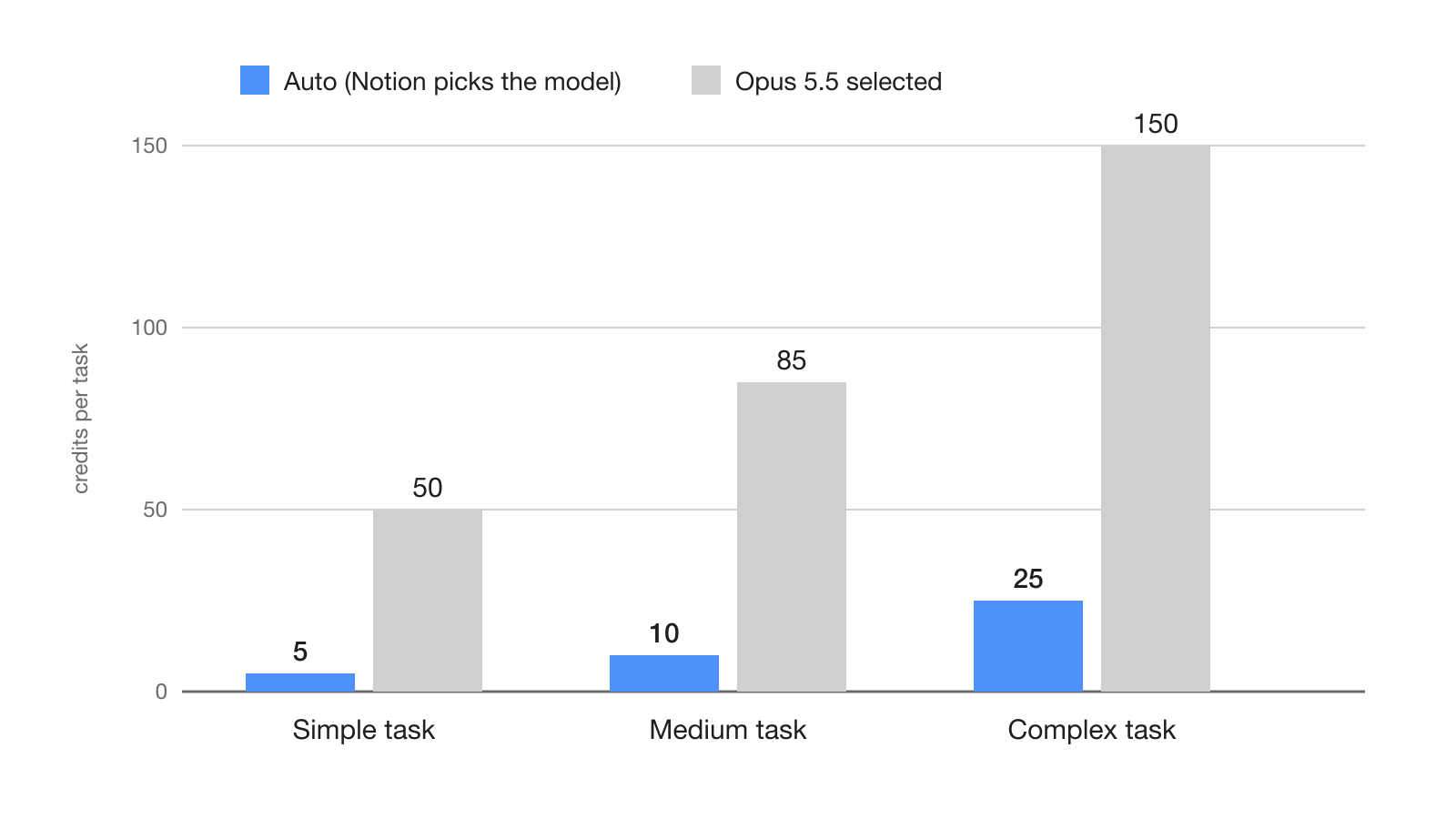
These are Notion's estimates, and the help page says actual use varies [3]. The gap is widest for simple tasks, at 10 to 1, and narrows to 6 to 1 for complex ones.
How do Standard, Select and Notion credits work?
Business and Enterprise seats now come with two separate monthly allowances per member: 1,500 Standard credits for work where Notion picks the model through Auto, and 500 Select credits for work where you pick the model or run a Custom Agent you set up yourself [3]. Standard covers Notion Agent on Auto, writing, translation, AI blocks, formulas and inline editing.
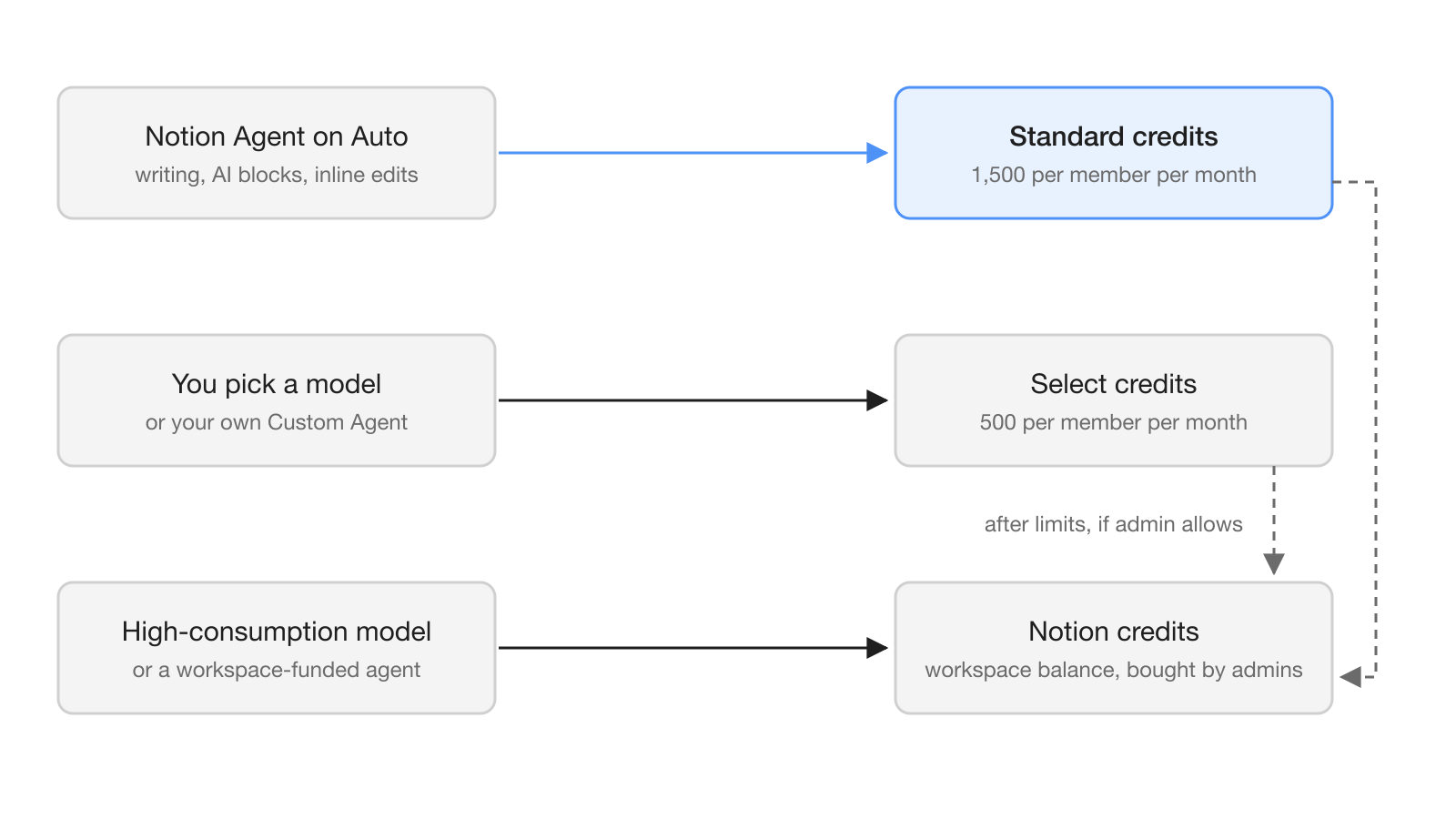
The rules are strict. Standard and Select credits reset monthly at the start of the billing cycle, do not roll over, and cannot be pooled across the workspace, moved between members or swapped for each other [3]. The included amounts may vary by plan and purchase arrangement.
Notion credits are a third, workspace-level balance that admins buy [4]. They pay for high credit consumption models such as Fable and Astra, for Custom Agents the workspace funds, for agent runs through the API or connected apps, and for usage beyond the included allowances when an admin allows it [1][3]. An admin must turn on high credit consumption models before members can use them [5].
The timing depends on the workspace. New Business and Enterprise workspaces moved to the new system on October 19, 2026, existing workspaces move on November 2, 2026, and AI Meeting Notes starts drawing on the Standard allowance on December 1, 2026 [3].
What does this mean for teams running AI agents?
For teams, a shared Custom Agent can now run all day, and who pays for it matters. A Custom Agent that a member sets up spends that member's Select credits, even when it is shared, until an admin funds it with Notion credits [3]. A busy team agent built by one person can therefore use up that person's 500 Select credits and stall.
The fix is to fund team agents from the workspace balance. Notion's FAQ says team Custom Agents use Select credits by default unless an admin funds them [1]. For everyday work, Notion recommends Auto, which Standard credits should cover.
Bring-your-own-AI options change the math for some members. People can connect a ChatGPT Plus, Pro or Go plan to their personal Notion Agent, but not to Custom Agents, and Bring Your Own Key is in private alpha for Enterprise [1][2]. The Notion MCP server now syncs memories, and Skills via MCP are listed as coming soon.
How do you prepare a workspace for the new credits?
Admins have until November 2, 2026 for existing workspaces, and the settings already exist [3].
- Check allowances in Settings, Notion AI, Usage. Members see their own Standard and Select balances there.
- Decide on overages. The option "Allow workspace to use Notion credits after AI limit is reached" sits under Settings, Notion AI, is off by default, and covers both Standard and Select.
- Fund shared Custom Agents with Notion credits, so they do not drain one member's Select allowance.
- Watch spending in Settings, Access & billing, Notion credits, where each member has a row and high-consumption model usage is listed.
- Tell members that when Select runs out, they can switch Notion Agent back to Auto and keep working on Standard credits.
To give agents more tools, add MCP servers from the agent chat through All sources, MCP servers, Add MCP server, or from Settings, Connections, Discover. New servers cannot be connected on mobile [5].
What are the limits and open questions?
Several pieces are not shipped yet. The AI Command Center, which will show usage by member, feature and agent, set spending limits and alerts, choose allowed models and control who can create, pause or archive Custom Agents, is listed as coming soon [1][2]. Until it ships, the Notion credits dashboard and the overage switch are the documented controls for spend [3].
The performance claims are Notion's own. The blog post does not name the 20+ use cases behind the Auto comparison, the models Auto routes to, or how "similar results" was judged [1]. The pages also do not say how many credits a 24-hour run uses, or which actions "Review for me" flags. Teams planning long-running agents should test them on a small workload and read the credits dashboard before they scale up.
Frequently asked questions
How long can a Notion agent work on one task?
Since October 19, 2026, Notion Agents can work on a single task for up to 24 hours, up from five minutes. Each session runs on a dedicated service with a queue-backed worker loop so the work survives restarts.
What is the difference between Standard and Select credits in Notion?
Standard credits pay for work where Notion picks the model through Auto, and each Business or Enterprise member gets 1,500 a month. Select credits pay for work where you pick the model or run your own Custom Agent, with 500 a month per member.
Do unused Notion AI credits roll over?
No. Standard and Select credits reset monthly at the start of the billing cycle, do not roll over, and cannot be pooled, transferred between members or exchanged for each other.
Who pays for a shared Custom Agent in Notion?
A Custom Agent spends the Select credits of the member who set it up, even when it is shared, unless an admin funds it with the workspace's Notion credits.
When does the new Notion credit system start?
New Business and Enterprise workspaces moved to it on October 19, 2026, and existing workspaces move on November 2, 2026. AI Meeting Notes starts using Standard credits on December 1, 2026.