How do dynamic workflows work in Claude Managed Agents?
Claude Managed Agents added dynamic workflows in beta: the agent writes a program that runs up to 1,000 agents in phases in the background.
Key takeaways
- Claude Managed Agents added dynamic workflows in beta on October 9, 2026.
- The agent writes a program that runs many agents in phases in the background.
- Enable it with the multiagent_20261001 type; the agent decides when to start a run.
- A run can start 1,000 agents, with up to 64 threads working at once.
- A completed run means the program finished, not that the work passed.
On this page
Dynamic workflows are a beta feature of Claude Managed Agents, added on October 9, 2026. The agent a session runs writes a workflow: a program that runs many agents in phases and combines their results. The server runs it in the background as a workflow run. You turn it on in the agent's multiagent block with the multiagent_20261001 type and follow each run through workflow_run.* events on the session stream [1].
What changed on October 9?
Claude Managed Agents now lets an agent hand work off by writing a program, on top of the existing ways to delegate. The release note describes it for tasks like reviewing hundreds of documents. You enable it by setting the agent's multiagent field to {"type": "multiagent_20261001", "workflows": {"type": "enabled"}} and sending the managed-agents-2026-04-01 beta header [1].
The feature is not new to Claude Code. Anthropic introduced dynamic workflows there on May 28, 2026, and that post now says they are generally available in Claude Code [5]. What is new is the hosted, API-driven version: Managed Agents runs the workflow on the server, inside a session your application controls.
The multiagent_20261001 type puts three options in one block. Subagents and dynamic workflows are on by default, and the advisor is off [2].
| Option | What the agent does | Default with multiagent_20261001 |
|---|---|---|
| Subagents | Delegates tasks itself and reads each subagent's report | Enabled |
| Dynamic workflows | Writes a program that runs many agents and combines their results | Enabled |
| Advisor | Consults another model mid-turn and keeps doing the work itself | Disabled |
The older coordinator type can still delegate to subagents you list and consult an advisor. It cannot start workflow runs or define subagents itself, and the API accepts both types [2].
How does a workflow run work?
A workflow run is one execution of the program the agent wrote, and it runs in the background while the agent keeps working or ends its turn [3]. The program can split the work into named phases, run many agents at the same time, pass one agent's result to another, repeat a step until a review passes, and decide what to do when an agent fails. Each agent works in its own session thread, and all of them share the session's sandbox and its files.
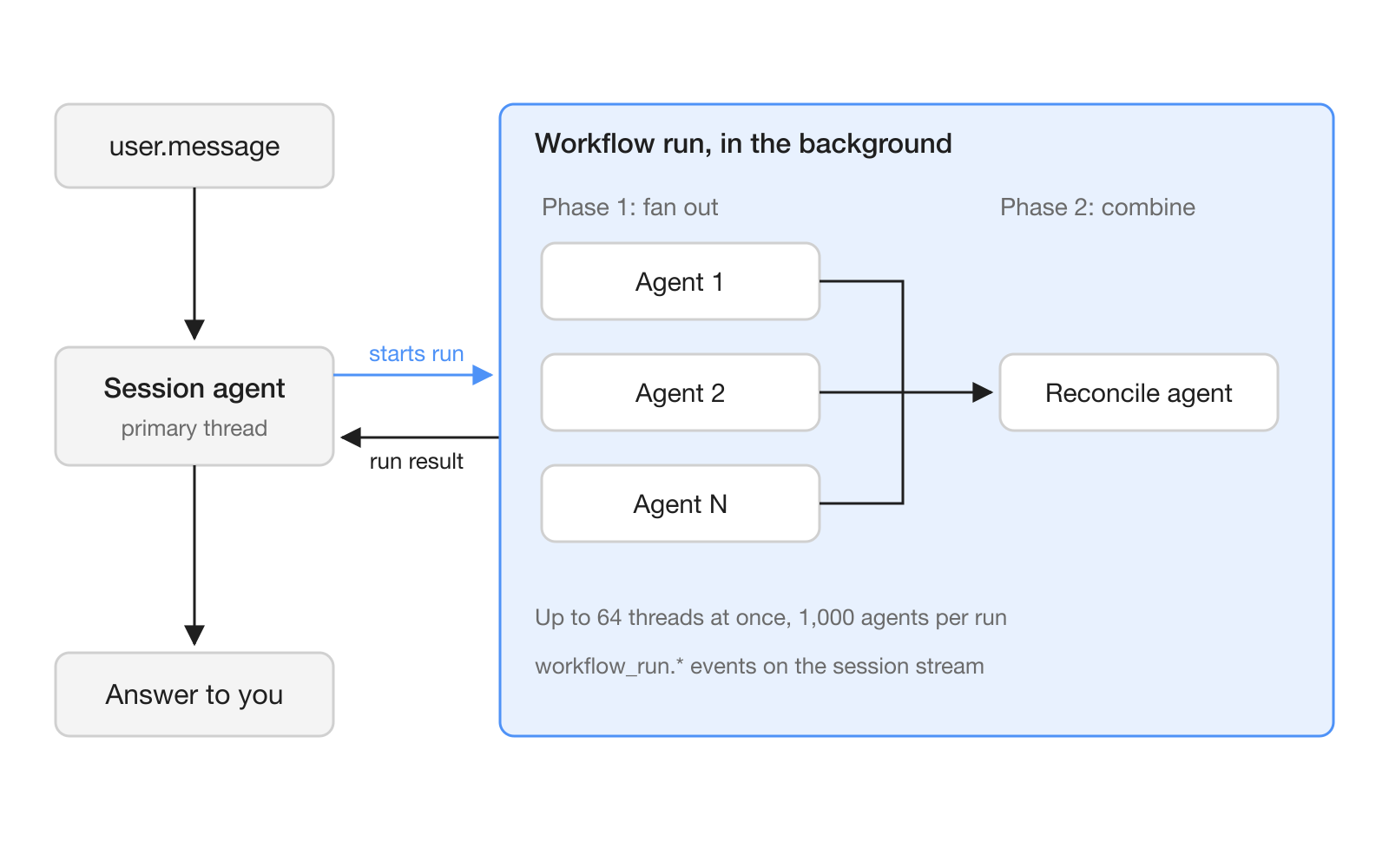
The difference from subagents is who coordinates. With subagents, the agent decides each next step, and a subagent's thread stays open for follow-up messages. With dynamic workflows, the program passes context and results between agents without Claude's direct involvement. That leaves the main thread free to talk to the user, but the agent cannot send follow-ups to a run's threads, and the server archives each one by the end of its run [2].
A run's agents come from two places. Inline agents are defined by the workflow, which writes a system prompt for each, and they use the session agent's model. Predefined agents are ones you created and listed in workflows.predefined_agents, up to 20 of them, each with its own model, tools and MCP servers [2]. To use a cheaper model for the fan-out, create that agent and list it.
Only the agent on the session's primary thread can start a run, so runs do not nest. No event you send ends a run, although archiving the session can [3].
How do you turn on dynamic workflows?
You enable workflows in the agent definition and tell the agent, in its system prompt, when a run is worth it. There is no separate API call to start a run. You describe the work in a user.message, and the agent decides whether and when to start one [2].
This Python example follows the contract reviewer in the official docs:
import anthropic

client = anthropic.Anthropic()

agent = client.beta.agents.create(
    name="Contract Reviewer",
    model="claude-opus-5-5",
    system=(
        "You review contracts. When you're asked to review more than a few "
        "contracts, start a workflow run that reads them in parallel and "
        "combines the findings. Review one or two contracts yourself, without a run."
    ),
    tools=[{"type": "agent_toolset_20260401"}],
    multiagent={"type": "multiagent_20261001", "workflows": {"type": "enabled"}},
)
For dynamic workflows without delegation, add "subagents": {"type": "disabled"} to the same block. To allow only agents you created, set inline_agents to {"type": "disabled"} under workflows and list at least one agent, or the request fails with a 400 error [2].
The docs suggest putting the run's rules in the prompt as well: one agent per document, a second agent that reviews every result, a rule that one failed agent must not fail the run, and a time limit [2].
Three details catch existing setups:
- Sessions keep their copy. A session copies the setting when it is created, so changing the agent does not change sessions that already exist [2].
- Moving from
coordinatorreplaces the block. The update replaces the wholemultiagentblock. If you leave outworkflows, it takes its default and is enabled; if you leave out your subagent list, it is emptied [2]. - The
ant__prefix is reserved. A custom tool whose name starts withant__makes every agent update fail with a 400 error until you rename or remove it [2].
How do you follow a run and know when it is done?
You follow runs on the session's event stream, through seven event types. workflow_run.created lists the run's name and declared phases, workflow_run.phase_started and workflow_run.phase_ended mark progress, workflow_run.status_running and workflow_run.status_idle report pauses and resumes, workflow_run.error reports errors, and workflow_run.status_ended carries the result [3]. Run events do not trigger webhooks.
A short loop over the stream, adapted from the docs sample, tracks open runs:
open_runs = {}

with client.beta.sessions.events.stream(session_id) as stream:
    for event in stream:
        if event.type == "workflow_run.created":
            open_runs[event.workflow_run_id] = event.name
        elif event.type == "workflow_run.status_ended":
            open_runs.pop(event.workflow_run_id, None)
            print(event.result.type)
        elif event.type == "session.status_idle":
            if not open_runs and event.stop_reason.type == "end_turn":
                break
The work is done only when every run you saw created has its workflow_run.status_ended, and a session.status_idle with end_turn arrives after that. A paused run does not keep the session running, so an idle session alone does not mean the work is finished [3]. A production client also has to answer tool calls from a run's threads as they arrive, which the full docs sample shows.
Read the result carefully. completed means the program finished, not that the work passed: a run can end completed even though work on some threads failed. The other results are stopped and errors of type timeout_error, program_error, thread_limit_error and unknown_error [3].
What does it cost, and what are the limits?
A run has no price of its own. Its agents' tokens are billed at each model's rates and count toward the session budget and your Messages API rate limits [3]. Managed Agents also bills session runtime at $0.08 per session-hour, measured while the session is running [4]. For Claude Code, Anthropic warns that dynamic workflows "can consume substantially more tokens than a typical Claude Code session" [5].
The documented limits, as of October 13, 2026 [3]:
| Limit | Value | At the limit |
|---|---|---|
| Threads working at once in one run | 64, not guaranteed | No new threads until one finishes |
| Agents a workflow starts over a run's life | 1,000 | Run ends with thread_limit_error |
| Run lifetime | 24 hours by default, or what the agent sets | Run ends with timeout_error |
| Runs open at once in a session | 10 by default | Start refused with max_workflow_runs_error |
What does this mean for teams running AI agents?
For teams, dynamic workflows move large, parallel jobs such as audits, migrations, deep research and cross-checking from a script you maintain into one agent request. The docs name those four as examples of work that suits a run [2]. The person asking still talks to one agent on the primary thread, while the run works in the background.
The trade-off is visibility. You do not see the workflow's code, the tool calls that start and manage runs, or the result each thread returns to the workflow. You can ask the agent to print the workflow once the run has ended [3]. Teams that need an audit trail should make that request a routine step.
What are the limits and open questions?
The feature is in beta, and several behaviors are explicitly not guaranteed. The 64-thread concurrency figure can change, no event says which phase a thread works in, and no endpoint lists runs, so a client that reconnects has to rebuild run state from past events [3].
Two operational points need care. A run can create more than one thread for the same piece of work, so the docs advise making the tools your agents call safe to call twice. Inline agents get the session agent's tools and MCP servers, and the API does not guarantee they get all of them [3]. The docs do not publish all of the server's other limits on workflows, and the release notes give no date for general availability in Managed Agents.
Frequently asked questions
What is the difference between subagents and dynamic workflows in Claude Managed Agents?
With subagents, the agent delegates each task itself, reads each report, and can send follow-up messages to a subagent. With dynamic workflows, the agent writes a program that runs many agents in phases and passes results between them, and the agent cannot send follow-ups to a run's threads.
How do I start a workflow run in Claude Managed Agents?
There is no separate API call. You enable workflows in the agent's multiagent block with the multiagent_20261001 type, describe the work in a user.message, and the agent decides whether and when to start a run. A system prompt that says when to use a run guides that choice.
How many agents can a dynamic workflow run?
A workflow can start up to 1,000 agents over a run's life, with up to 64 threads working at once, a figure Anthropic does not guarantee. A run lasts 24 hours by default, and a session can have 10 runs open at once by default.
How much do dynamic workflows cost in Claude Managed Agents?
A workflow run has no separate price. The tokens its agents use are billed at each model's rates and count toward the session budget, and Managed Agents adds session runtime at $0.08 per session-hour while the session is running.
Does a completed workflow run mean the work succeeded?
No. The completed result only means the workflow program finished. Work on some of the run's threads can still have failed, so check each thread's events or have the workflow review its own results.