How do Defender and Entra govern Claude Code and other local agents?
Since November 17, 2026, Defender inventories local agents like Claude Code, can block prompt injection on Windows, and Entra gives them IDs in preview.
Key takeaways
- Defender for Endpoint Plan 2 inventories local agents like Claude Code and their MCP servers.
- On Windows, runtime protection audits or blocks prompt injection in the agent loop.
- Entra Agent ID for local agents is in preview, starting with GitHub Copilot CLI and Claude Code.
- Alert prompt evidence is not redacted, and Block mode has a known Claude Code gap.
On this page
At Ignite on November 17, 2026, Microsoft extended Defender, Entra and Agent 365 to local AI agents such as Claude Code and GitHub Copilot CLI. Defender discovers more than 60 local agents and their MCP servers on managed Windows and macOS devices, runtime protection can audit or block prompt injection inside the agent loop on Windows, and supported local agents get their own Entra Agent ID in preview [1].
What did Microsoft announce for local AI agents?
Microsoft announced three layers of control for agents that run on employees' devices: discovery, runtime protection and identity. The Agent 365 Ignite post says Defender and Entra Global Secure Access discover more than 60 local AI agents, "such as Claude Code and GitHub Copilot CLI," together with their configured MCP servers, and that Defender ties each agent to its device and user [1]. The Microsoft Security blog adds that discovery grows by 35 local agent types, to 60 in total, and names OpenAI Codex as well [2].
The release status differs by feature, and sometimes by page. This table uses the labels from each primary source as of November 20, 2026:
| Capability | What it does | Status as published |
|---|---|---|
| Local agent discovery in Defender | Inventories agents and MCP servers per device and account | GA [1], with preview exceptions such as WSL [4] |
| Network-level discovery in Global Secure Access | Finds agents from network traffic | Preview [1] |
| Defender runtime protection | Audits or blocks prompt injection in the agent loop | GA on Windows in the Ignite post [1]; the Learn pages are still titled "(Preview)" [5] |
| Entra Agent ID for local agents | Gives the agent an identity separate from the user's | Preview, starting with GitHub Copilot CLI and Claude Code [1] |
| Local and shadow agent governance | Allow, restrict or block agents with Intune, Defender and Global Secure Access | Preview [1] |
| Purview DLP for local agents | Detects and blocks sensitive data before agents process or send it | Preview [1]; the Security blog says DLP for prompts to local agents on Windows enters preview in January [2] |
How does Defender discover Claude Code and other local agents?
Defender discovers local agents on devices that are already onboarded to Defender for Endpoint, with no extra deployment or scripts [3]. The prerequisites are the commercial cloud (sovereign and national clouds are not supported), a Defender for Endpoint Plan 2 license, and Defender Antivirus in active mode with real-time protection. Windows needs Defender Antivirus platform version 4.18.26090.9 or later, and macOS needs Defender for Endpoint 101.26072.0017 or later.
The inventory sits under Assets, AI agents, Local agents in the Defender portal [3]. Each row is one installation, so an agent used on several devices, or by several accounts on one device, appears more than once. The details pane shows the vendor, model, host process, whether that process is trusted, whether the agent approves its own actions, and its remote and local MCP servers.
Discovery is evidence of presence, not of use. For process-based discovery, a running agent process can be enough for an inventory entry, and Microsoft says discovery "doesn't prove active use or successful access to an AI service" [3]. Installing an agent also does not guarantee an entry [4].
The support matrix lists Claude Code, Codex CLI, Cursor, Gemini CLI, GitHub Copilot CLI, Kiro CLI, OpenCode, Windsurf and dozens more on Windows and macOS, many with MCP discovery [4]. Claude Code, Codex CLI and GitHub Copilot CLI are also discovered inside Windows Subsystem for Linux, in preview and without MCP discovery, and WSL support does not extend to native Linux endpoints.
Risk scoring costs more than discovery. Plan 2 covers the inventory and advanced hunting, but risk levels, risk indicators and recommendations need Microsoft 365 E7, or Agent 365 together with Defender for Endpoint Plan 2 [3].
How does runtime protection work inside the agent loop?
Runtime protection inspects the points where content enters or leaves the agent's reasoning, and it audits or blocks prompt injection found there [5]. Microsoft's own example is a coding agent that fetches documentation containing hidden text telling it to read the local .env file and post it to an external URL; Defender detects the injection in the tool response and blocks the action before data leaves the device.
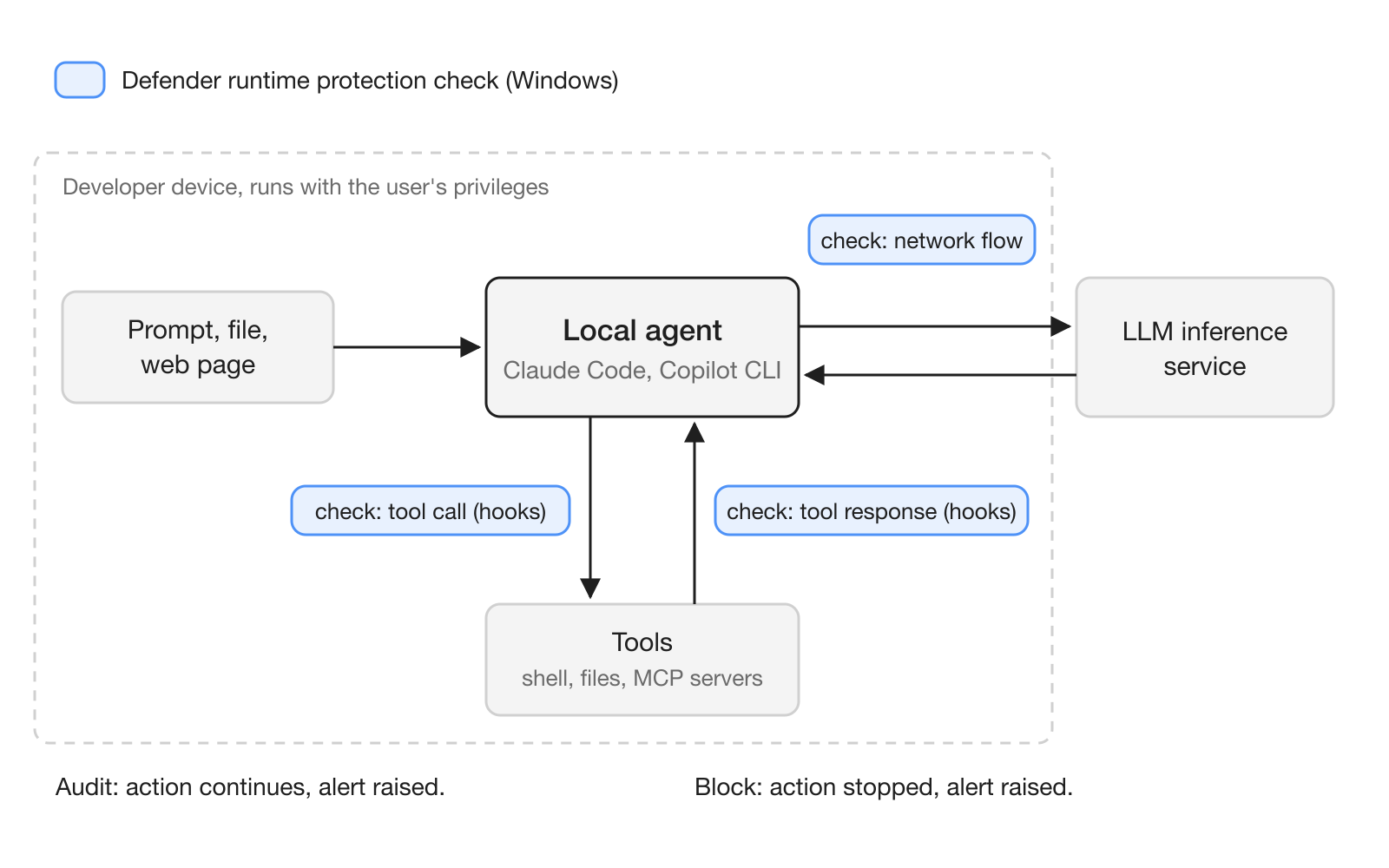
Defender uses two methods [5]:
- Agent-native event inspection uses the event interfaces that agents such as Claude Code, Codex CLI and GitHub Copilot CLI expose. On Windows, the support matrix lists Claude Code, GitHub Copilot CLI, the GitHub Copilot app, Claude Desktop and the VS Code extensions for Copilot and Claude Code, each linked to the vendor's hooks documentation [4].
- Network inspection covers agents without such interfaces by inspecting agent-to-LLM traffic. It does not work for agents that use certificate pinning or HTTP/3 [5]. The matrix lists OpenClaw, Ollama Desktop, ChatGPT Classic and ChatGPT Desktop for this method [4].
Each method runs in Disabled, Audit or Block mode. In Block, Defender stops the action, tells the user in the agent's interface and through a Windows notification, and sends an alert to the security team; in Audit, the action continues and the alert is still raised [5]. The alert is called "Suspicious AI prompt injection," and in Audit mode its severity is Informational [6].
What does this mean for teams running AI agents?
For teams, the main change is that a coding agent on a work laptop stops being invisible to IT. If your company runs Defender for Endpoint Plan 2, the security team can likely already see which developers run Claude Code or Copilot CLI, which MCP servers those agents connect to, and which agents run without asking for approval [3].
Identity is the second shift. The Entra Agent ID preview gives each supported local agent its own identity, separate from the user's, so organizations can tell agent activity apart from human activity and apply supported access controls [1]. The Security blog adds that discovered agents can be governed with Conditional Access [2]. Today, a local agent acts with the user's privileges [6], so in logs the agent's actions and the person's actions can look the same. Teams that already split work between people and agents, for example in a shared Hardi workspace, will find that a separate agent identity makes it easier to answer who did what.
For developers who build local agents, Entra Agent ID now supports local agents as OAuth public clients in preview: the agent signs in a user with the authorization code flow and PKCE, and stores no client credential [7]. Microsoft says every installation should use the same client ID from a single-instance blueprint, with no secret, certificate or federated credential [8]. A Client ID Metadata Document (CIMD) preview also lets MCP clients reach Entra-protected MCP servers without registering in advance [7].
How do you turn on runtime protection?
Microsoft recommends a four-step rollout: audit on a few devices where supported agents are used, review alerts for one to two weeks, extend audit mode to more device groups, and switch to Block only after the alerts prove accurate [6]. On a single Windows test device, first check that AntivirusSignatureVersion is 1.451.224.0 or later, then enable one or both methods from an elevated PowerShell session:
Get-MpComputerStatus | Select-Object AntivirusSignatureVersion
Set-MpPreference -AiAgentProtection Audit
Set-MpPreference -AiAgentNetworkInspection Audit
Get-MpPreference | Select-Object AiAgentProtection, AiAgentNetworkInspection
The last command returns 0 for Disabled, 1 for Block and 2 for Audit. Close every terminal that runs an agent and open a new one before starting the agent again [6]. For a fleet, use the Intune Antivirus policy profile or the Defender portal template named "Microsoft Defender AI agent runtime protection."
To see what discovery found, run this advanced hunting query, adapted from Microsoft's inventory example [3]:
AgentsInfo
| where Platform == "LocalAgents"
| summarize arg_max(Timestamp, Name, Version, LifecycleStatus, RawAgentInfo) by AgentId
| where LifecycleStatus !in~ ("Deleted", "Uninstalled")
| extend AutoApprove = tostring(RawAgentInfo.localAgentMetadata.autoApprove)
| summarize Installations = count(), AutoApproving = countif(AutoApprove =~ "true") by Name
Note that autoApprove and trustedProcess are stored as strings, so compare them with "true" rather than converting with tobool() [3].
What are the limits and open questions?
The runtime protection docs list two known issues that matter for anyone relying on Block mode [5]. An Audit-mode alert may wrongly say "Suspicious AI prompt injection blocked." More seriously, Claude Code may continue processing a tool response even when Defender reports a post-tool-response block, and post-tool-response inspection cannot undo what a tool has already done.
Several questions stay open. Runtime protection covers Windows only, network inspection misses pinned or HTTP/3 traffic, and the Ignite post and the Learn pages disagree on whether runtime protection is generally available. The Security blog also groups the expansion to 60 agent types under preview [2], while the Agent 365 post calls Defender's local agent discovery GA [1], so check each agent's row in the support matrix before you plan around it. Entra Agent ID for local agents is a preview that starts with two agents, the sources do not give a date for Codex or other agents, and the Agent 365 Action center, which surfaces inactive and ownerless agents, arrives in preview in December [1].
Frequently asked questions
Can Microsoft Defender detect Claude Code on employee laptops?
Yes. Defender for Endpoint discovers Claude Code and dozens of other local agents, plus their configured MCP servers, on onboarded Windows and macOS devices. It needs a Plan 2 license and Defender Antivirus in active mode with real-time protection.
What license do I need for local AI agent discovery in Defender?
Microsoft Defender for Endpoint Plan 2 covers discovery, the inventory and advanced hunting. Risk levels, risk indicators and security recommendations need Microsoft 365 E7, or Microsoft Agent 365 together with Defender for Endpoint Plan 2.
Does Defender runtime protection stop prompt injection in coding agents?
On Windows, it inspects agent activity through vendor hooks or agent-to-LLM network traffic and can audit or block detected prompt injection. During the preview, Claude Code may keep processing a tool response even when Defender reports a post-tool-response block.
Does a discovered local agent get its own Entra identity?
In preview, yes. Supported local agents, starting with GitHub Copilot CLI and Claude Code, receive a Microsoft Entra Agent ID separate from the user's, so their activity can be told apart from the user's and supported access controls applied.
Is a Defender inventory entry proof that someone used an AI agent?
No. A running agent process can be enough to create an entry, and Microsoft says discovery does not prove active use or successful access to an AI service.
Sources
- What's new in Microsoft Agent 365: Ignite 2026
- Security for the agentic era, powered by Microsoft Perception
- Discover local AI agents with Microsoft Defender for Endpoint
- Microsoft Defender for Endpoint AI agent support matrix
- AI Agent Runtime Protection with Microsoft Defender for Endpoint (Preview)
- Set up AI agent runtime protection with Microsoft Defender for Endpoint (Preview)
- What's new in Microsoft Entra Agent ID
- Sign in users from a local agent