GPT-6.2 Astra and Sol: what changes for agents on the Responses API?
GPT-6.2 Astra and Sol, released November 17, 2026, drop reasoning after history edits, move instructions after input and add 2h and 8h discount windows.
Key takeaways
- gpt-6.2-astra ($8/$40 per 1M tokens) and gpt-6.2-sol ($2/$10) reached the API on November 17, 2026.
- History edits, some model changes and user or organization changes now drop reasoning items.
- Top-level instructions follow input and are billed uncached; stable ones belong in a developer message.
- 2h or 8h background windows cut model token rates by 30% or 40%; Flex is not supported.
On this page
GPT-6.2 Astra and GPT-6.2 Sol are two OpenAI models added to the API on November 17, 2026. Astra (gpt-6.2-astra) is for demanding reasoning and coding. Sol (gpt-6.2-sol) is for everyday coding and agent workflows [1]. If your agent loop runs on the Responses API, check four changes before you switch: reasoning items are dropped after history edits, top-level instructions now come after input, sampling parameters are removed, and Flex processing is not available [2].
What are GPT-6.2 Astra and Sol?
Both models share the same limits but differ in price. Each has a 1,050,000-token context window, accepts at most 922,000 input tokens and returns at most 128,000 output tokens. Both take text and image input and produce text only [3][4]. OpenAI describes Astra as its "most capable model for your hardest projects" and Sol as its "go-to model for everyday work, from coding to powering agents at scale" [3][4].
| GPT-6.2 Astra | GPT-6.2 Sol | |
|---|---|---|
| Model ID | gpt-6.2-astra | gpt-6.2-sol |
| Input, per 1M tokens | $8 | $2 |
| Cached input, per 1M tokens | $0.40 | $0.10 |
| Output, per 1M tokens | $40 | $10 |
| Cache write, 30-minute TTL | $10 | $2.50 |
| Knowledge cutoff | May 18, 2026 | June 1, 2026 |
| Context window | 1,050,000 tokens | 1,050,000 tokens |
The prices are Standard rates from the model pages [3][4]. Long prompts cost more. Above 272K input tokens, input and cache rates double and output costs 1.5 times the short-context rate. Batch costs 50% of Standard and Fast mode costs 2 times Standard. Ultrafast costs 3 times Standard through February 28, 2027 and 6 times Standard from March 1, 2027 [3].
Both models work with Chat Completions, Responses and Batch. Neither supports Realtime, Assistants or fine-tuning. Through the Responses API they can use web search, file search, code interpreter, hosted shell, apply patch, skills, computer use, MCP and tool search [3]. Tool calling requires the Responses API [1], so an agent that calls tools through Chat Completions has to move to Responses first.
What changes in the Responses API with GPT-6.2?
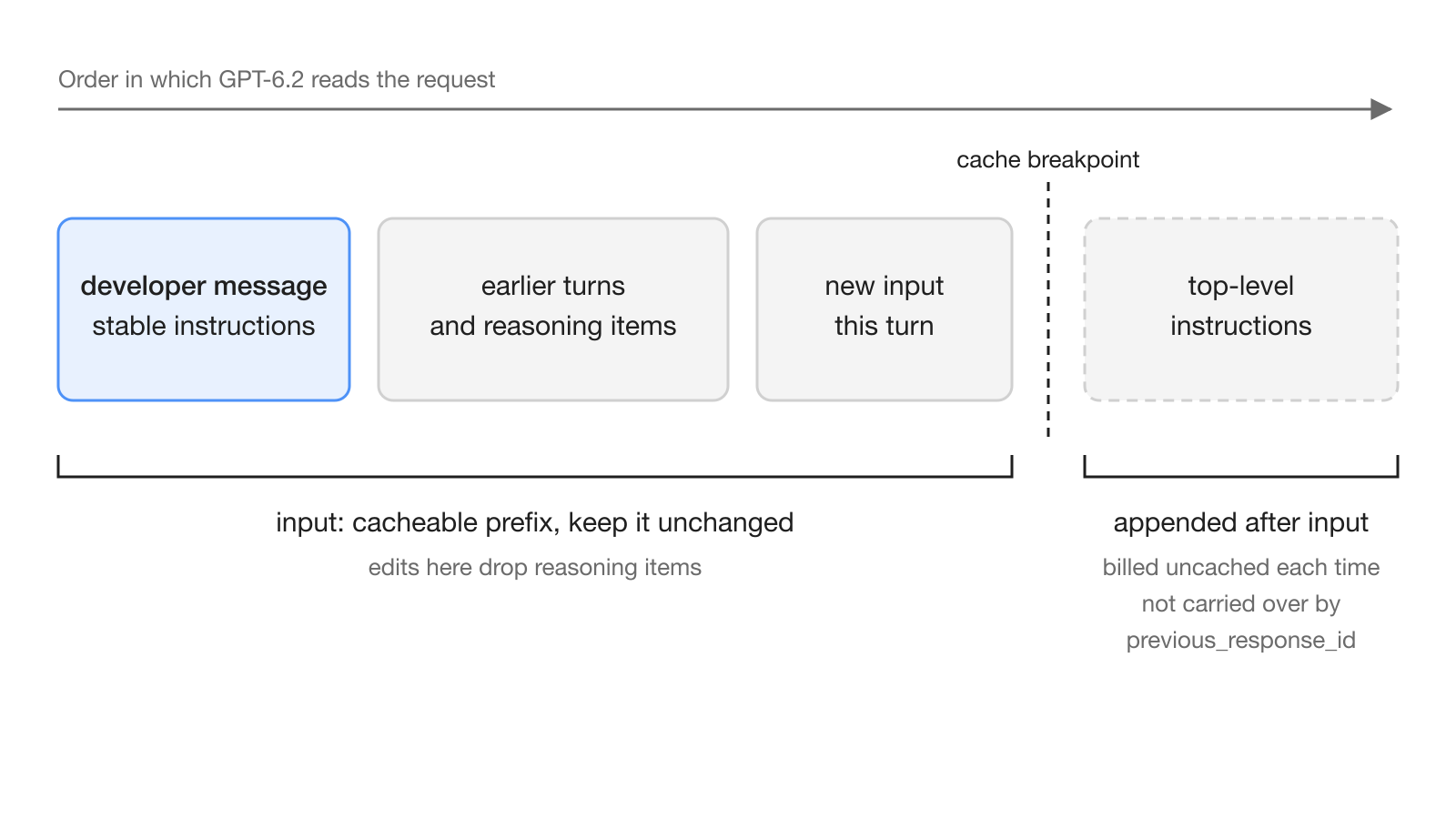
GPT-6.2 makes two behavior changes that matter for long agent conversations. The first concerns reasoning items. Starting with GPT-6.2, the Responses API drops reasoning items after three kinds of change: mid-conversation edits to the history (prefix edits), certain model changes including downgrades, and changes to the end user or organization [2]. The guide warns that without them, answer quality can drop and the model may spend more tokens redoing earlier work.
This matters for agent loops that rewrite history. Editing earlier tool calls, rewording an earlier developer message, or downgrading the model partway through a task can each trigger it. OpenAI's advice is to leave the prefix as it is when you change settings between responses. That also keeps earlier input eligible for prompt caching [2].
The second change is where instructions go. Models from GPT-6.2 on append the top-level instructions field after input [2]. The prompt caching guide spells out the cost. Those instructions sit beyond any cache breakpoint, so they are billed at the uncached rate on every request, even when they repeat. They also do not carry over with previous_response_id. A developer message at the start of input stays in the conversation history and can be cached [6].
What breaks when you migrate an agent to GPT-6.2?
The migration guide lists parameter removals that will break requests copied from older models [2]:
| Area | What to change |
|---|---|
| Sampling (Chat Completions) | Remove temperature, top_p, logprobs and top_logprobs |
| Sampling (Responses) | Remove temperature, top_p and top_logprobs, and drop message.output_text.logprobs from include |
| Reasoning effort | Start new integrations at medium; replace none or minimal with low |
| Tool calling | Use the Responses API |
| Processing tier | service_tier: flex is not supported |
| Cache lifetime | Coming from GPT-5.5 or earlier, replace prompt_cache_retention with prompt_cache_options.ttl set to "30m" |
| Zero Data Retention | store is treated as false; pass prior output items back in order, including encrypted reasoning items |
Both model pages say the API rejects a reasoning effort of none [3][4]. Data residency also varies by tier. Both models support US and EU residency with Standard, Fast and Batch processing, but Ultrafast is US only [2].
Output style changes too. The guide says GPT-6.2 Astra is more concise and direct by default than earlier models, so revisit any "be concise" instructions. It also says the model may propose a next step and wait for confirmation. If your agent should keep going on its own, say so in the prompt: proceed within scope, and stop only for blockers, decisions the user must make, or irreversible actions [2].
The cache bill works differently as well. For GPT-5.6 and later models, cache writes are a total rate of 1.25 times the uncached input rate for the 30-minute TTL and 2.5 times for the 12-hour TTL. Cache reads cost 0.05 times the input rate on GPT-6.2 Astra and Sol. A prefix needs at least 1,024 visible input tokens to be cached [6].
How do the new background completion windows work?
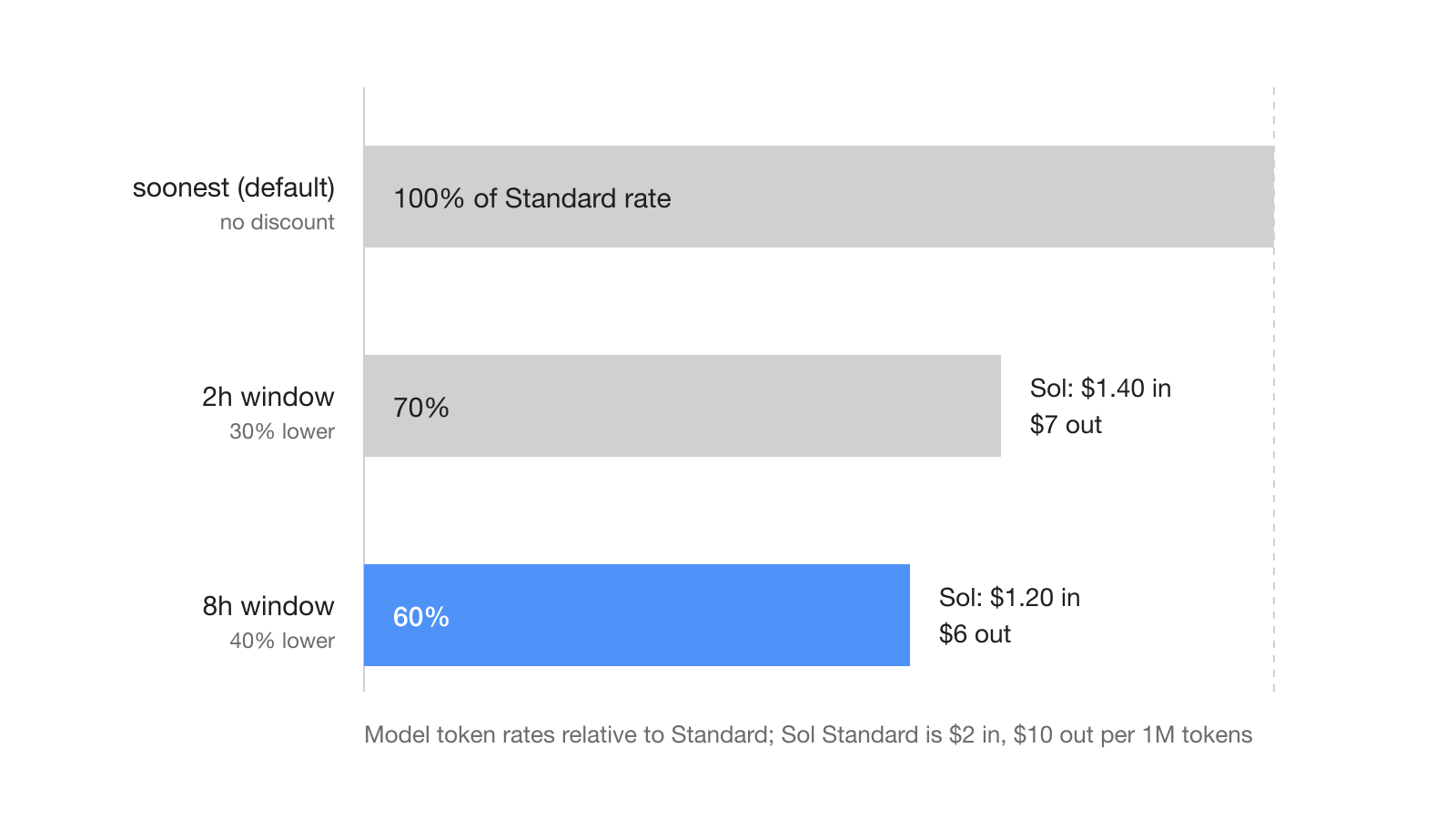
Background completion windows are a public beta, also released on November 17, 2026. You let a Responses request finish within 2 or 8 hours instead of as soon as possible, and in return model token rates are 30% or 40% lower than Standard. They work with gpt-6.2-astra, gpt-6.2-sol, gpt-6.1-terra and gpt-6-luna [1]. For GPT-6.2, the migration guide presents them as the alternative to Flex processing [2].
To use one, set background to true, leave streaming off, set service_tier to default and set background_options.completion_window to 2h or 8h. The default window is soonest, which gets no discount. With service_tier: auto, a request gets the discount only if the API selects Standard processing [5].
A request body for an overnight agent job looks like this:
{
  "model": "gpt-6.2-sol",
  "background": true,
  "service_tier": "default",
  "background_options": { "completion_window": "8h" },
  "reasoning": { "effort": "medium" },
  "prompt_cache_options": { "ttl": "30m" },
  "input": [
    { "role": "developer", "content": "You triage the open support tickets and draft replies." },
    { "role": "user", "content": "Process today's queue." }
  ]
}
The API "targets completion within the selected window after it accepts the request," and it retries eligible capacity errors automatically [5]. The guide does not say what happens to a response that misses its window. To collect results, subscribe to webhooks such as response.completed, or poll the response by ID while its status is queued or in_progress. To cancel, send POST /v1/responses/{id}/cancel.
Three rules affect planning [5]:
- Requests with
2hand8hwindows share the Batch/Background rate limit with Batch API jobs, and input tokens count against it when you submit. - Standard requests outside the discounted windows cannot reuse cache entries created by
2hor8hrequests, even for identical prompts. - Streaming works only with
soonest. Background mode stores response data temporarily even whenstoreisfalseor Zero Data Retention is on.
By the published rates, an 8-hour window brings GPT-6.2 Sol to $1.20 input and $6 output per million tokens, and GPT-6.2 Astra to $4.80 and $24 [1][3][4].
What does this mean for teams running AI agents?
For teams, the choice is mostly about the work, not the model name. Sol costs a quarter of Astra on input and output and has the same context window and tools [3][4], so it is the natural default for routine agent work. Keep Astra for the tasks that fail on Sol. Work that nobody is waiting on, such as nightly reports, backlog triage or research summaries, fits the 8-hour window. Interactive agents in a chat channel stay on soonest.
The reasoning-item rule also affects how teams run shared agents. Handing a thread from one organization to another drops reasoning items. Switching from Astra to Sol mid-conversation may count as a model change that drops them too; the guide names downgrades but does not list which switches qualify [2]. It is safer to pick the model when a task starts than to switch partway through.
What are the limits and open questions?
Some details are still missing from the documentation. The background guide does not say what happens when a discounted request misses its window [5]. The model pages list no dated snapshots, only the gpt-6.2-astra and gpt-6.2-sol IDs [3][4]. Neither model supports fine-tuning or predicted outputs, and audio and video input are not supported. The migration guide does not list exactly which model changes count as dropping reasoning, beyond "certain model changes (including downgrades)" [2]. Until it does, treat any model switch inside a conversation as one that may lose reasoning.
Frequently asked questions
What is the difference between GPT-6.2 Astra and GPT-6.2 Sol?
Astra is OpenAI's model for the most demanding reasoning and coding, at $8 input and $40 output per million tokens. Sol targets everyday coding and agent workflows at $2 and $10. Both have a 1,050,000-token context window and the same Responses API tools.
Does GPT-6.2 support temperature and top_p?
No. The migration guide says to omit temperature, top_p and top_logprobs, and on Chat Completions also logprobs, when you call gpt-6.2-astra or gpt-6.2-sol.
Why does GPT-6.2 lose reasoning in a long agent conversation?
From GPT-6.2 on, the Responses API drops reasoning items after edits to earlier conversation history, certain model changes including downgrades, and changes to the end user or organization. Keeping the prefix unchanged preserves reasoning and prompt caching.
How do background completion windows lower OpenAI API costs?
Set background to true, service_tier to default and background_options.completion_window to 2h or 8h on a Responses request. Model token rates are 30% lower than Standard for 2h and 40% lower for 8h, in public beta.
Can I use Flex processing with GPT-6.2?
No. GPT-6.2 Astra and Sol do not support service_tier flex. OpenAI offers the discounted 2-hour and 8-hour background completion windows as the alternative for long-running Responses requests.