What is Gemini API Tool Retrieval, and how do agents use it?
Gemini API Tool Retrieval, in preview since November 19, 2026, lets agents defer tool schemas with defer_loading and load them on demand.
Key takeaways
- Gemini API Tool Retrieval entered preview on November 19, 2026, in the Interactions API only.
- Deferred tools show only a name and description until the model loads the full schema.
- Search, schema load and function call happen in one request in server-side mode.
- There is no separate charge; each server-side search is an extra model call billed as input.
On this page
- What is Gemini API Tool Retrieval?
- How does Tool Retrieval work?
- How do you turn it on?
- What changes in multi-turn conversations?
- When should you use client-side retrieval or MCP deferral?
- What does Tool Retrieval cost?
- How does it compare with Claude's tool search tool?
- What does this mean for teams running AI agents?
- What are the limits and open questions?
Tool Retrieval is a preview feature of the Gemini Interactions API, announced on November 19, 2026, that lets a Gemini agent keep a large tool library without sending every parameter schema on every request [1]. You mark tools with defer_loading: true and add a tool_search tool. The model then sees only each deferred tool's name and description, and it loads the full schema of a tool only when it needs that tool [2].
What is Gemini API Tool Retrieval?
Tool Retrieval is Google's answer to a scaling problem for agents with dozens or hundreds of tools. Lucia Loher, a product manager on the Gemini API, and Nora Kassner, a research scientist at Google DeepMind, describe what happens when every full parameter schema travels with every request: input tokens grow, latency rises, and the model can get worse at picking the right tool [1].
The feature is in preview, requires the v1beta API version, and works only on the Interactions API, not on generateContent [2]. The Interactions API itself has been generally available since June 2026 and is the interface Google recommends for new projects [3].
Supported models, as listed in the guide, are gemini-4-carbon, gemini-4-neon, gemini-4-hydrogen, gemini-4-argon, gemini-3.8-flash and gemini-3.6-flash [2]. The announcement puts it more broadly as Gemini 3.6 and later, including all Gemini 4 models [1]. On any other model, a request that defers tools fails with the error "deferred loading is not supported for this model" [2].
How does Tool Retrieval work?
Tool Retrieval works by splitting each tool into a cheap summary that the model always sees and a full schema that it loads on demand. With the default server-side mode, the search, the schema load and the function call all happen inside one API request [1]:
- You add
{"type": "tool_search"}to thetoolsarray and setdefer_loading: trueon each function you want to hold back [2]. - The model sees the name and description of every deferred tool, but not its parameter schema.
- When it needs a tool, it asks for it by name. The API loads that schema, and the model emits a normal function call.
- The response lists the steps in order:
tool_search_call,tool_search_result, thenfunction_call. Your application runs only thefunction_call[2].
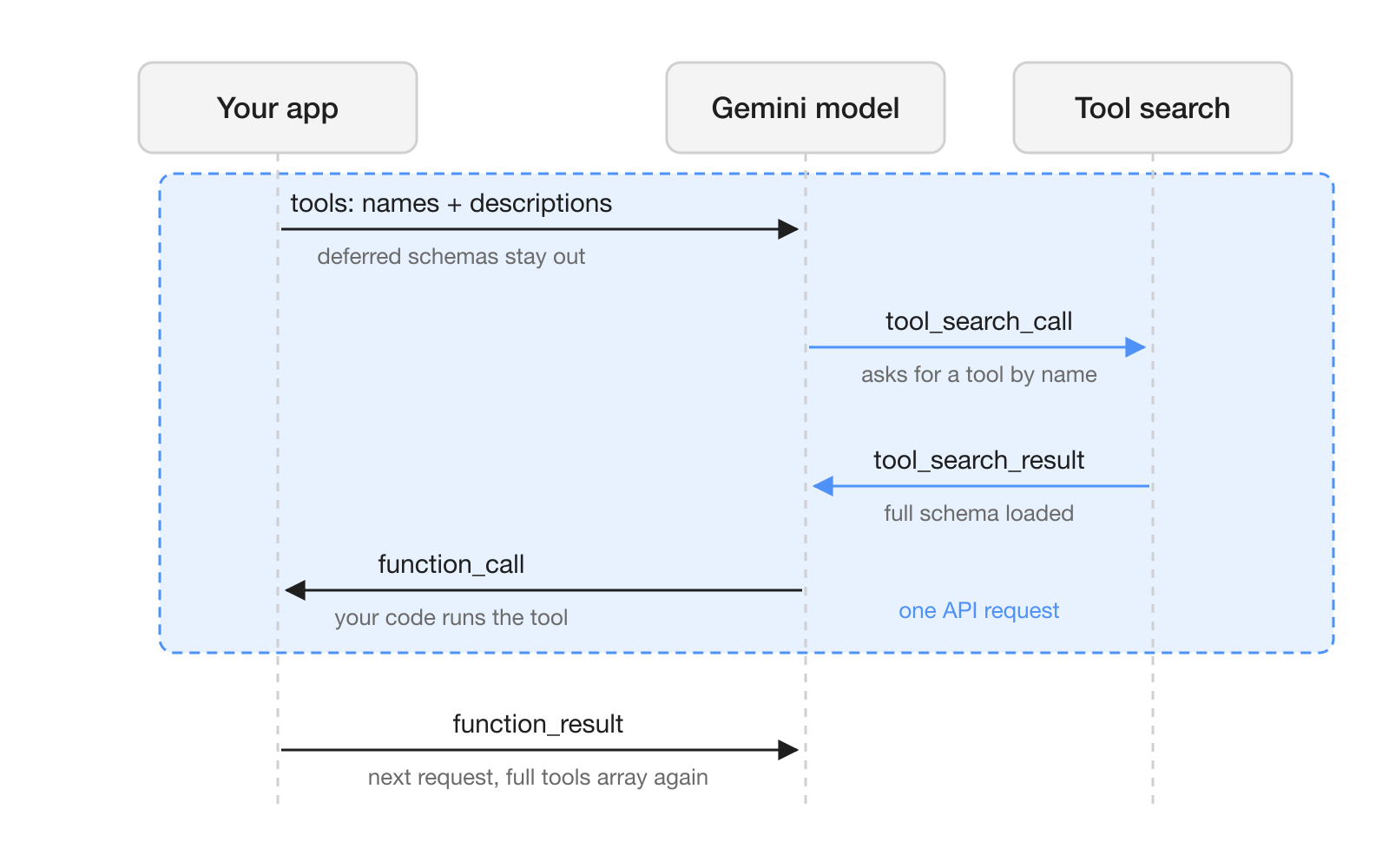
There is no index to build or host, because Gemini runs the search on its own servers [1]. Since the retrieval steps appear in the response next to the function call, you can see which tools the model looked up, which helps when a tool name or description is misleading.
Tool Retrieval also fits with prefix caching. Deferred schemas stay out of the prompt prefix, so the cached prefix stays stable from turn to turn [1]. Retrieved schemas are appended inline, so implicit caching still applies once the prefix reaches the minimum cacheable size [2].
How do you turn it on?
You turn it on with two changes to an existing Interactions API request: one tool_search entry and a defer_loading flag on the tools you want to defer [2]. The sketch below follows the shape of the Python example in the guide; the function and its parameters are placeholders.
tools = [
    {"type": "tool_search"},
    {
        "type": "function",
        "name": "billing_issue_refund",
        "description": "Billing: refund an order to the original payment method.",
        "parameters": {
            "type": "object",
            "properties": {
                "order_id": {"type": "string"},
                "amount": {"type": "number"},
            },
            "required": ["order_id", "amount"],
        },
        "defer_loading": True,
    },
    # ... the rest of the long tail, each with "defer_loading": True
]

interaction = client.interactions.create(
    model="gemini-4-hydrogen",
    input="Refund 40 dollars on order A-1042.",
    tools=tools,
)

for step in interaction.steps:
    if step.type == "function_call":
        ...  # run the function, then send a function_result
The guide's configuration rules are short [2]:
| Setting | Rule |
|---|---|
execution | "server" (default) or "client" |
name, description on tool_search | Required for client-side search (parameters is optional); do not set them for server-side |
defer_loading | Works on function and mcp_server entries, and needs server-side tool_search |
short_description | A compact summary shown during retrieval; valid only with defer_loading: true |
Number of tool_search entries | One per request |
Three habits from the guide prevent most surprises. Keep the tools you use most loaded and defer the long tail. Do not defer a tool that your system instructions or tool outputs mention by name. And check interaction.steps for a function_call on every response, because status is not always requires_action when there is one [2].
What changes in multi-turn conversations?
In multi-turn conversations you have to carry the retrieval steps forward yourself. The API does not persist tool declarations, so every request, including the follow-up that carries a function_result, must resend the full tools array [2].
If you run with store=false and manage history on your side, append every response step unchanged and keep tool_search_call and tool_search_result in order. Retrieval steps carry an encrypted signature that must be passed back as is [2]. Note that store=false also rules out previous_interaction_id [3].
When should you use client-side retrieval or MCP deferral?
Use client-side retrieval when your tool list is not fixed, and use MCP deferral when one remote server exposes many tools. The guide gives a simple rule: static loading suits fewer than 20 stable tools, server-side retrieval suits large known libraries and MCP servers and is the better choice for latency, and client-side retrieval suits dynamic registries, namespaces or per-user tools [2].
For client-side retrieval you declare tool_search with "execution": "client" and give it your own name and description, plus optional parameters, for example a query and an optional namespace filter. When the model calls it, your application runs the lookup and returns complete function declarations in function_result.result. Each search costs one extra round trip, chained with previous_interaction_id [2]. In exchange, tools do not need to be declared up front, so you can expose new ones mid-conversation, for example right after a user connects an integration [1]. This mode is also where an existing embedding index or a per-user permission filter fits.
For remote MCP servers, setting defer_loading: true on an mcp_server entry defers every tool that server exposes, so you do not list a large server tool by tool [1]. The calls come back as mcp_server_tool_call and mcp_server_tool_result steps [2].
What does Tool Retrieval cost?
Tool Retrieval has no separate charge; tokens bill at the model's standard input, cached and output rates [2]. The savings come from schemas that are never loaded, and Google does not publish a token or latency figure, so the announcement asks you to measure against your own traffic [1].
The accounting has four parts:
- Enabling
tool_searchadds a small, fixed block of input tokens [1]. - Each deferred tool adds only its name and
short_description, or the first sentence of itsdescription, tototal_input_tokens[2]. - Each server-side search triggers an extra model call whose prompt tokens appear in
total_tool_use_tokensand bill at the input rate [2]. - A schema the model loads is billed as input for the rest of the conversation, as if you had declared it up front [1].
The guide adds two caveats. Deferring can shrink a prompt below the minimum cacheable size, and static loading may cost less for small libraries or for long contexts that search on every turn [2].
How does it compare with Claude's tool search tool?
Gemini Tool Retrieval follows the same pattern as Anthropic's tool search tool for Claude, which also uses a defer_loading flag, but the two differ in how search runs and in what a miss looks like [2][4].
| Gemini Tool Retrieval | Claude tool search tool | |
|---|---|---|
| Status | Preview, Interactions API, v1beta [2] | Stable on the Messages API [4] |
| Enable | {"type": "tool_search"} plus defer_loading | tool_search_tool_regex_20251119 or tool_search_tool_bm25_20251119 plus defer_loading |
| Own search logic | tool_search with "execution": "client" | A custom tool that returns tool_reference blocks |
| MCP | defer_loading on an mcp_server entry | defer_loading in the mcp_toolset configuration |
| Search with no match | Text response, not a structured error | Empty tool_references array, not an error |
On the Claude side, a request can defer up to 10,000 tools and each search returns 5 tools by default [4]. The Gemini guide does not state a maximum number of deferred tools or results per search [2]. If your agents run on both providers, you can keep one tool registry and the same keep-core, defer-the-tail split, but the history handling differs and needs separate code.
What does this mean for teams running AI agents?
For teams, Tool Retrieval makes it cheaper to give one Gemini agent access to many systems at once. An agent that serves a support team, an operations team and a finance team no longer pays for every schema of every connected service on every turn, and the steps in each response show which tools the model looked up. That trace is useful when two teams own tools with similar names: the guide recommends prefixing similar tool names by service and naming the service at the start of each short_description [2].
Client-side retrieval matters most where tool access differs per person. Because your code answers each search, it can return only the tools the current user is allowed to use, and it can add a tool when someone connects a new integration during the conversation [1].
What are the limits and open questions?
Tool Retrieval is a preview, so the API may change before general availability. The guide lists these limits [2]:
- Server-side and client-side retrieval cannot be combined in one request.
defer_loadingapplies only to server-side retrieval.- The model may issue several searches in one turn.
- Loaded tools stay in context for the rest of the conversation.
- A search that matches no deferred tool returns a text response, not a structured error.
The open questions are about measurement. Google gives no token or latency numbers for typical libraries, and it gives no recall figures, so you cannot yet tell from the documentation how often the search misses a tool that would have been right [1]. Before you defer a production tool set, compare total_input_tokens, total_tool_use_tokens and tool-call accuracy on a sample of real conversations with and without deferral.
Frequently asked questions
Which Gemini models support Tool Retrieval?
Google's guide lists gemini-4-carbon, gemini-4-neon, gemini-4-hydrogen, gemini-4-argon, gemini-3.8-flash and gemini-3.6-flash. Requests that defer tools on other models fail with a 'deferred loading is not supported' error.
Does Gemini Tool Retrieval work with generateContent?
No. Tool Retrieval is a preview feature that works only on the Interactions API and requires the v1beta API version.
Does Tool Retrieval cost extra in the Gemini API?
There is no separate charge, and tokens bill at the model's standard rates. Each server-side search is an extra model call whose prompt tokens are reported in total_tool_use_tokens and billed at the input rate, so small tool libraries may cost less with static loading.
Can I use my own tool registry or embedding index with Gemini Tool Retrieval?
Yes. Declare tool_search with execution set to client, run the lookup in your application and return full function declarations in a function_result. Each search adds one round trip, and you can expose new tools mid-conversation.
How do I defer all tools of an MCP server in the Gemini API?
Set defer_loading to true on the mcp_server entry and include a server-side tool_search tool. Every tool that server exposes is then loaded on demand, and calls return mcp_server_tool_call and mcp_server_tool_result steps.